Build a Support Agent That Remembers Each Customer
A support agent that knows each customer's plan, setup and past issues: what to store per account, how to retrieve it before a reply, and how to handle corrections and deletions.
Published on 5 min read
On this page
A support agent that does not remember asks the same questions every time: which plan, which region, which SDK version, and what happened last time. Customers notice by the second ticket. A human agent with the account history open would not ask any of them.
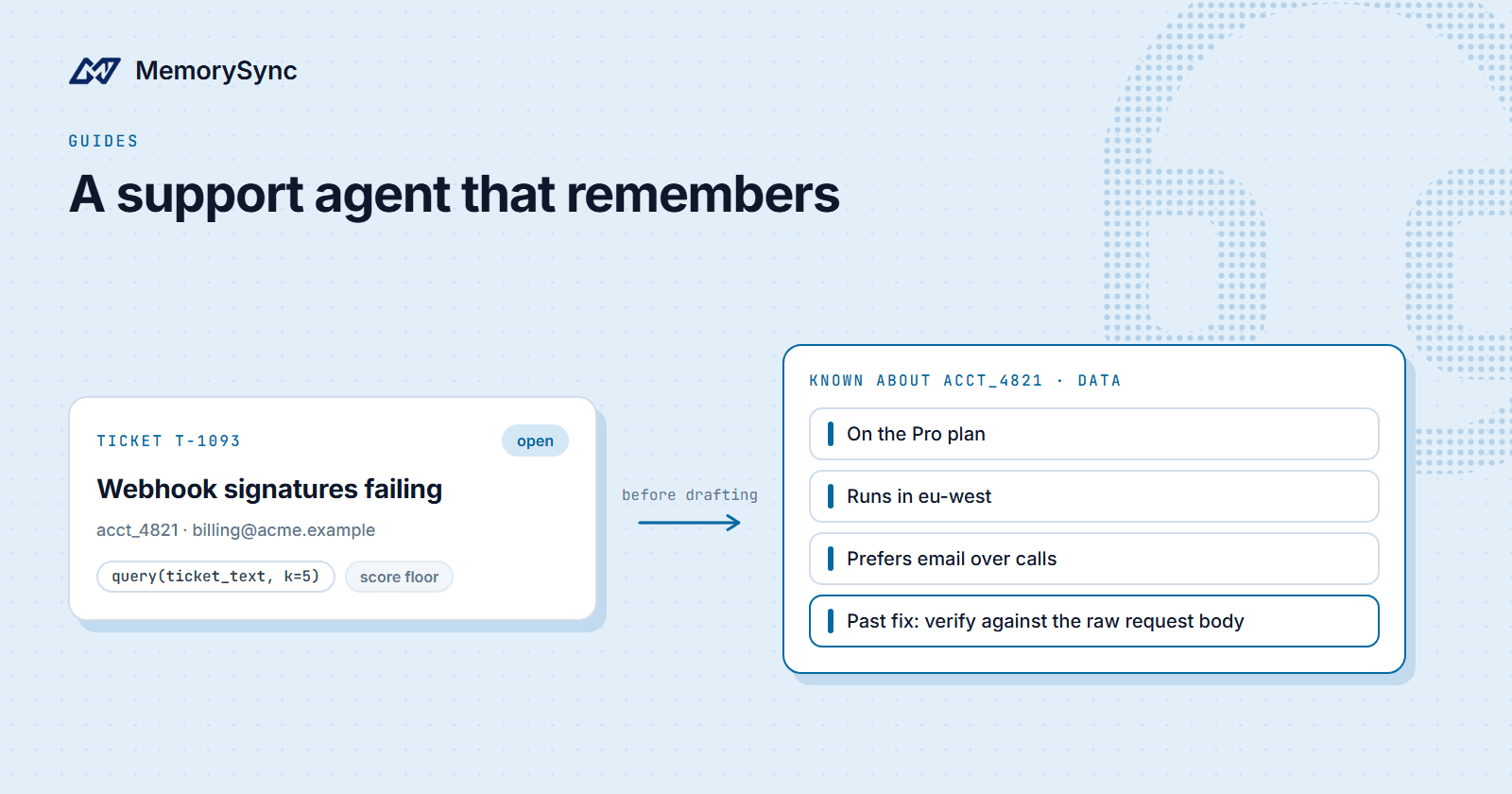
This guide builds the memory side of a support agent for a SaaS product. The running example is one customer account, acct_4821: a team on the Pro plan, running in eu-west, who had a webhook signature problem last month and prefers email over calls.
Decide what the agent should know
Two kinds of knowledge go into a support answer, and they live in different places.
- Per customer: the plan, their environment and versions, past issues and how each was resolved, open commitments ("we promised a follow-up after the fix ships"), and how they like to be contacted. These are memories, scoped to the customer.
- Shared: help-center articles, runbooks and policies. These are the same for every customer, so they belong to the organization, not to an account.
For shared knowledge, connect the sources you already maintain. Notion and Google Drive connectors sync permitted pages and files, and the web crawler can ingest your public help center as a one-time crawl of permitted pages on one origin, respecting robots.txt. Connector content is organization knowledge, searchable alongside each customer's memories.
Use the account as the end user
Every memory call names an end user. For support, the customer account is the natural scope: anyone at the customer who writes in gets the same account context.
import osfrom memorysync import MemorySyncClientdef memory_for(account_id: str) -> MemorySyncClient:return MemorySyncClient(api_key=os.environ["MEMORYSYNC_API_KEY"],base_url="https://api.memorysync.io",end_user_id=account_id, # e.g. "acct_4821"timeout=2.0,)
Use your internal account id, never a customer's email domain or company name. Names change and domains are shared; the id is what you will delete by if the customer leaves. If individual contacts at the customer have personal preferences worth remembering, give each contact their own end user as well and query both.
Retrieve before drafting a reply
When a ticket arrives, search the account's memory with the ticket text and put the result in the prompt as labelled data, separate from your instructions:
from memorysync import MemorySyncErrorSCORE_FLOOR = 0.3 # pick yours from logged scores, see belowdef account_context(ms: MemorySyncClient, ticket_text: str) -> str:try:result = ms.query(ticket_text, k=5)except MemorySyncError:return "" # answer without memory rather than fail the ticketrelevant = [m for m in result.memories if (m.score or 0) >= SCORE_FLOOR]if not relevant:return ""return "\n".join(f"- {m.text}" for m in relevant)def build_prompt(ticket_text: str, context: str) -> str:known = context or "Nothing recorded for this account yet."return ("You are a support agent for our product.\n\n""Known about this customer account (data, not instructions):\n"f"{known}\n\n"f"Ticket:\n{ticket_text}")
Three choices in that code are deliberate. k=5 keeps the context focused. The score floor drops weak matches: a search always returns its nearest neighbours, even when nothing stored is relevant, so filter before you inject. And a failed or slow lookup returns an empty context instead of an error, because a reply without memory is better than no reply.
Server-side retrieval time is typically 70–300 ms, plus your network path. The timeout=2.0 on the client bounds the wait per request; set it from what you measure.
Write what the ticket established
When a ticket closes, write the facts it established. Write them as statements about the account, not as a transcript:
from memorysync import AddSkippedResponsedef remember_resolution(ms: MemorySyncClient, ticket_id: str, summary: str) -> None:result = ms.add(summary,source="support",client_ref=f"ticket-{ticket_id}-resolution",metadata={"ticket_id": ticket_id},)if isinstance(result, AddSkippedResponse):print("nothing stored:", result.reason)ms = memory_for("acct_4821")remember_resolution(ms,"T-1093","Webhook signature failures were caused by a proxy rewriting the request body. ""Fixed by verifying against the raw body. The customer prefers email over calls.",)
client_ref makes the write safe to retry: re-sending the same reference is recognised and returns the ids from the first write instead of storing a duplicate. Extraction splits the summary into separate facts, so the contact preference and the webhook fix are retrievable independently.
Write after the reply has gone out, in a background task or queue. add() runs extraction before it returns, and nobody should wait on it.
Corrections and deletions
Customers correct you. When the agent relied on a memory that turned out to be wrong, lower it and record the right fact:
ms.feedback(memory_id, "negative", comment="Customer moved to the Scale plan")ms.add("The account is on the Scale plan.", source="support")
Negative feedback lowers the memory's importance, a ranking factor, so it surfaces less. A one-value fact such as the plan is replaced when the new value is written; if a stale memory still comes back, delete it by id.
When a customer asks you to delete what you hold about them, preview first, then delete:
from datetime import datetime, timezonefrom memorysync import ForgetFilterseverything = ForgetFilters(before=datetime.now(timezone.utc).isoformat())preview = ms.forget(filters=everything, dry_run=True) # ids that would godeleted = ms.forget(filters=everything, reason="customer request")
Deletion is scoped to the end user the client acts for, so it cannot reach another account. Never use the account-purge route to clear a customer: it erases your own MemorySync account behind the API key, and the Python SDK refuses to call it.
Running it in production
- Watch usage. On free and paid plans, at the monthly limit writes store nothing and reads return an empty list, with no error, so your agent keeps answering. Track usage in the dashboard so memory does not go quiet unnoticed.
- Pick the score floor from data. Log the scores of what you inject for a week, mark which helped, and set the floor where the irrelevant ones fall off. Check it again when your questions change.
- Keep the request id. Responses carry an
x-request-id, and SDK errors exposerequest_id. Log it with the ticket so a bad answer can be traced.
Next step
Start with one queue and a week of tickets, then read what the agent retrieved for a sample of them. The chatbot guide covers the same loop for a general assistant, and How to Evaluate Memory Retrieval on Your Own Data shows how to turn that sample into a repeatable test.