Long-Term Memory for n8n AI Agents
Give n8n AI Agents memory that survives executions and restarts: a Chat Memory sub-node for the transcript, and a MemorySync node to store and recall facts per end user.
Published on 4 min read
On this page
An n8n AI Agent forgets everything when an execution ends unless its memory port is connected to something durable. The simple buffer memory lives in the running instance, so a restart or a redeploy clears it, and nothing carries what a user said last week into today's run.
The n8n-nodes-memorysync community package adds two nodes. MemorySync Chat Memory plugs into the AI Agent's memory port and keeps each session's transcript across executions. MemorySync is a regular workflow node for storing, searching and recalling facts per end user, and an AI Agent can also call it as a tool.
Install
In a self-hosted n8n, open Settings → Community Nodes → Install and enter:
n8n-nodes-memorysync
Then create a MemorySync credential and paste an API key with read and write scopes. The credential test runs a real query, so a wrong key fails at setup rather than in the middle of a workflow.
Two requirements to check first:
- Self-hosted n8n. Community nodes are not available on n8n Cloud until a node is verified, and verification for this package is in progress.
- n8n 2.16.0 or newer for the Chat Memory sub-node, the first release that ships the AI node SDK it builds on. On older versions the MemorySync workflow node still works, and the sub-node tells you to update.
The two nodes
| Node | Where it goes | What it does |
|---|---|---|
| MemorySync Chat Memory | The AI Agent's memory port | Keeps the session transcript across executions, restarts and redeploys |
| MemorySync | Anywhere in a workflow, or as an agent tool | Add Memory, Add Conversation Turn, Search Memories, Recall Context, Get Many, Delete Memories |
The split matters. The transcript is the conversation as it happened, kept so the agent can continue a thread. Memories are the durable facts extracted from what users say, kept so any later conversation can use them. The Chat Memory node writes the transcript, and only the facts extracted from the user's turns appear as memories.
Wire up the Chat Memory
Attach MemorySync Chat Memory to your AI Agent's memory port and set three parameters:
Session ID: {{ $json.sessionId }}End User ID: {{ $json.userId }}Context Window Length: 10 # turn pairs loaded per run
Session ID identifies the conversation. End User ID is the scope: use a stable id from your own system, not a display name. Context Window Length caps how many recent turn pairs are loaded into each run, so a long conversation does not grow the prompt without limit.
Writes carry deterministic idempotency keys, so a retried execution does not duplicate a turn. If MemorySync is unreachable, the node degrades to "no history this run" and the agent still answers. Its clear() is deliberately a no-op, so an agent can never bulk-delete a customer's history.
Recall facts from other conversations
The transcript covers one session. For what a user said in earlier sessions, add the MemorySync node with the Recall Context operation before the agent. It returns a prompt-ready block of the user's relevant memories for a query, which you place in the agent's system message.
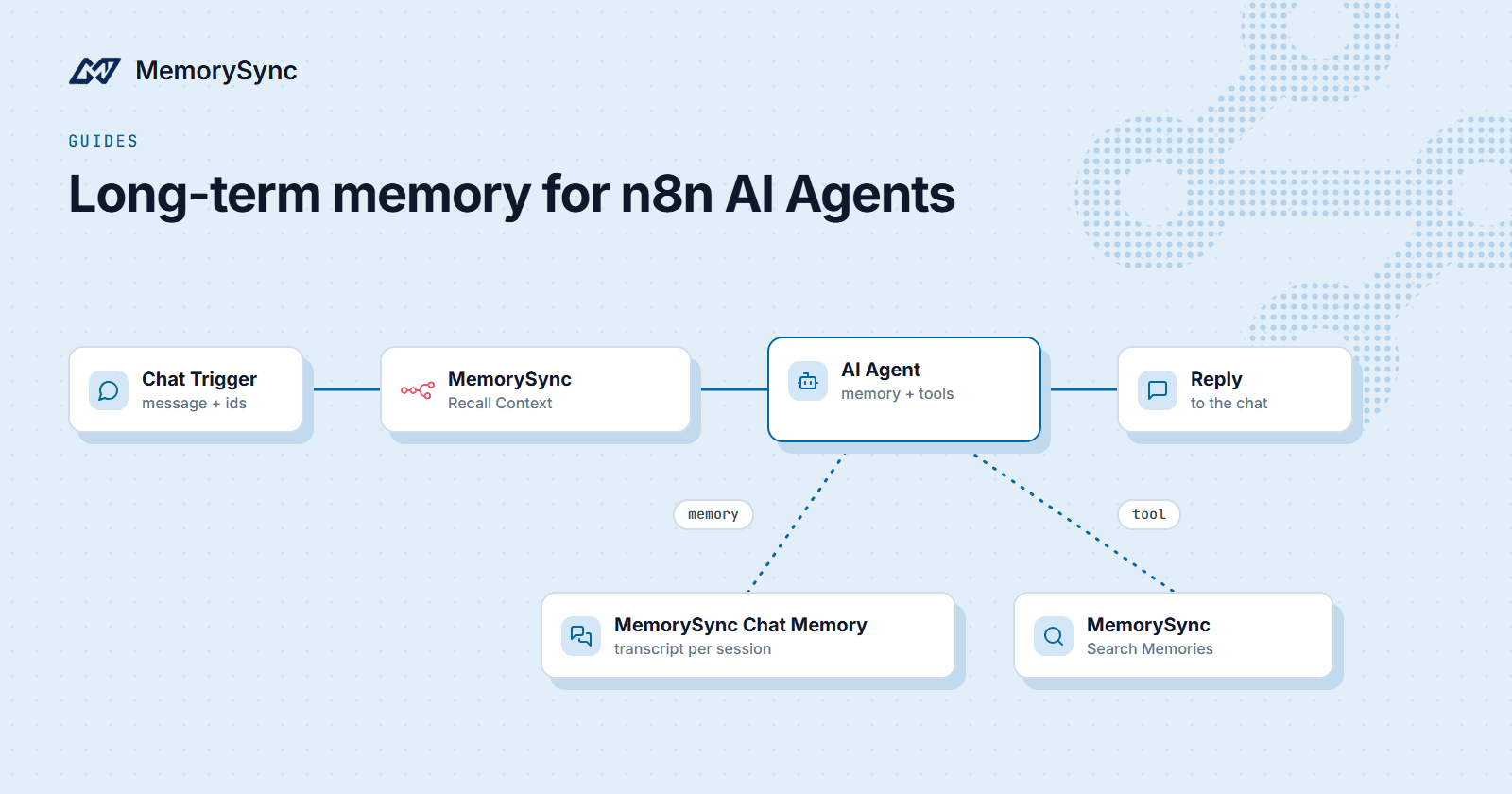
A typical chat workflow:
- Chat Trigger receives the message, with a session id and the user's id.
- MemorySync, Recall Context runs with the user's message as the query and the same End User ID.
- AI Agent gets the recalled block in its system message, with MemorySync Chat Memory attached for the thread.
- The reply goes back to the user. The Chat Memory has already recorded the turn, and the durable facts in the user's message are extracted into memories.
Recall Context counts as one retrieval per execution. Server-side retrieval time is typically 70–300 ms, plus the network path from your n8n instance to our API.
Let the agent use memory as a tool
The MemorySync node is marked usable as a tool, so you can connect it to the AI Agent's tool port and let the model decide when to search or store. Two configurations are common:
- Search Memories as a tool for an agent that should look things up on demand, for example "what plan is this customer on?".
- Add Memory as a tool for an agent that should save facts it judges durable. Text sent this way goes through extraction, so filler is dropped and only facts are kept.
Keep Delete Memories out of an autonomous agent's tools unless you have a reason. Deletion belongs in a workflow a person triggers.
Workflows without an agent
The same node is useful in plain automations:
- Add Conversation Turn after a form or chat message, to extract facts from what a user wrote. It writes to the same history the Chat Memory reads.
- Get Many to export a user's memories into a CRM record or a review step.
- Delete Memories in a data-request workflow, with the memory ids you collected first.
Every operation is scoped by the End User ID you pass, so a workflow acting for one user cannot read or delete another's memories.
Next step
Install the node in a test instance and run the four-step chat workflow above with two different End User IDs to see the scopes stay apart. The n8n guide documents every parameter of both nodes.