How to Evaluate Memory Retrieval on Your Own Data
Build an evaluation set from real requests, give every case its own test end user, score precision and recall at k with a short Python script, and rerun it often.
Published on 7 min read
On this page
A memory layer can do well on a public benchmark and still miss the one fact your assistant needs, such as the database a user's service runs on or the allergy they mentioned last month. The way to find out whether retrieval works for your users is to test it on cases built from their requests.
This post covers how to build that evaluation set, which numbers to track, and a short Python script that scores retrieval against MemorySync so you can rerun it on every change.
Why public benchmarks fall short
Public benchmarks such as LoCoMo and LongMemEval measure how well a system answers questions about long, published conversations. They put systems on the same footing, and we run both against the same public API an integration uses. What they cannot tell you is whether memory works in your product:
- Your facts are different. Your users mention plans, ticket numbers, allergies or database names, not the topics of a benchmark's conversations.
- Your users phrase things their own way. Real questions are short, vague and full of your product's vocabulary.
- Your facts change at your rate. How often a value changes, and whether it is a one-value fact such as a city, decides whether old values linger.
- Your settings are your own. Your k, your prompt and your model all change what a retrieved memory is worth.
A benchmark score averages over someone else's questions, so it cannot tell you which of your questions fail.
Build an evaluation set
- Sample real requests. Pull messages from your logs where memory should have helped: questions whose answer depends on something the user said earlier. Remove personal data before they leave production.
- Write the earlier facts. For each request, write the messages the user would have sent before, in the form your application sends them to
add(). - Label what should come back. For each fact that should be retrieved, store a short, distinctive substring, such as
lisbon. Optionally, list values that must not come back because the user has since changed them. - Give each case its own test end user, new on every run. The script below builds the id from a run id and the case id.
- Use a development key. The environment comes from the API key, so data written with a development key never mixes with production data.
Label with substrings, not full sentences. MemorySync extracts durable facts from what you send, so "I moved to Lisbon last month." comes back as "Lives in Lisbon". The label lisbon matches it; the original sentence would not.
Include negative cases too: questions about something the user never said. A query about something never stored can still return weakly related memories with low scores. In one test, "What is the user's favourite pizza topping?" returned "Prefers light UI theme" with a score of 0.119, while relevant hits in the same run scored between 0.43 and 0.64.
Negative cases show where a score floor would sit for your questions. A floor that suits one kind of question can cut relevant results for another, so set it from your own cases rather than from a number in a blog post.
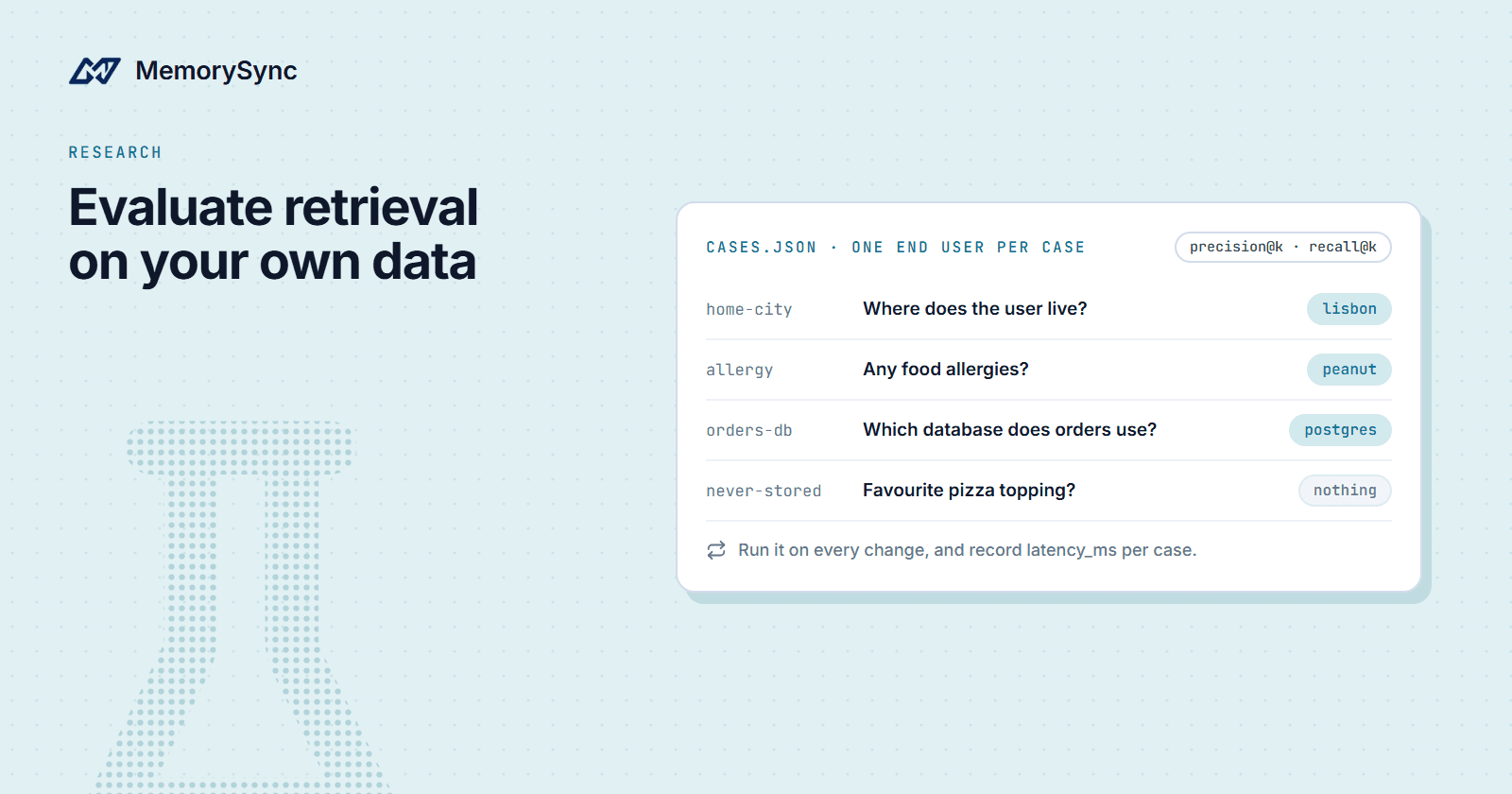
A case file looks like this:
[{"id": "home-city","facts": ["I live in Berlin.", "I moved to Lisbon last month."],"question": "Where does the user live?","expected": ["lisbon"],"stale": ["berlin"]},{"id": "allergy","facts": ["I am allergic to peanuts.", "I prefer dark mode in every editor."],"question": "Does the user have any food allergies?","expected": ["peanut"]},{"id": "orders-db","facts": ["Our orders service runs on MySQL.","We migrated the orders service from MySQL to Postgres last week."],"question": "Which database does the orders service use?","expected": ["postgres"],"stale": ["runs on mysql"]},{"id": "never-stored","facts": ["I prefer light mode in my editor."],"question": "What is the user's favourite pizza topping?","expected": []}]
The orders-db case is there on purpose. MemorySync replaces a one-value fact, such as a city, when a new value arrives, but not every change has that shape. In one test, after those two messages, the question "Which database does the orders service use?" still returned "Orders service runs on MySQL" first. A stale label catches that.
What to measure
| Metric | Definition | Measured on |
|---|---|---|
| Precision at k | Of the memories returned in the top k, the share that match a label | Retrieval results |
| Recall at k | Of the labels, the share found in the top k | Retrieval results |
| Repeat-question rate | The share of conversations in which the assistant asks for something the user already told it | Transcripts |
| Contradiction rate | The share of answers that conflict with what the user said, including answers that use a value the user has since changed | Answers |
Low precision means the prompt carries memories that do not help, which costs tokens and can mislead the model. Low recall means the model never sees a fact it needed. The two rates are what users notice: a repeated question points to a recall failure, and a contradiction points to a stale memory or a missed update.
Precision and recall are cheap to compute, so run them on every change. The two rates need whole conversations and a grader, a person or an LLM, so measure them on a sample on a schedule. The stale column in the script below is an early warning for contradictions at the retrieval step.
A minimal evaluation script
Save the cases as cases.json next to this script and run it with a development key in MEMORYSYNC_API_KEY:
import jsonimport osimport statisticsimport uuidfrom memorysync import MemorySyncClientK = 5RUN = uuid.uuid4().hex[:8] # new end users on every rundef client_for(case_id):return MemorySyncClient(api_key=os.environ["MEMORYSYNC_API_KEY"], # a development keybase_url="https://api.memorysync.io",end_user_id=f"eval-{RUN}-{case_id}",)def matches(text, labels):return any(label.lower() in text.lower() for label in labels)with open("cases.json") as f:cases = json.load(f)# 1. Write every case's facts, each case under its own end user.for case in cases:with client_for(case["id"]) as ms:for fact in case["facts"]:ms.add(fact)# 2. Ask each question and score the top k against the labels.rows = []for case in cases:with client_for(case["id"]) as ms:result = ms.query(case["question"], k=K)texts = [m.text for m in result.memories[:K]]expected = case["expected"]relevant = sum(matches(t, expected) for t in texts)found = sum(any(matches(t, [label]) for t in texts) for label in expected)scores = [m.score for m in result.memories if m.score is not None]rows.append({"id": case["id"],"precision": relevant / len(texts) if texts else 1.0,"recall": found / len(expected) if expected else 1.0,"stale": any(matches(t, case.get("stale", [])) for t in texts),"top": max(scores, default=0.0),"latency": result.latency_ms,})print(f"{'case':<16}{'P@k':>6}{'R@k':>6}{'stale':>7}{'top':>7}{'latency_ms':>12}")for r in rows:latency = "-" if r["latency"] is None else f"{r['latency']:.0f}"stale = "yes" if r["stale"] else ""print(f"{r['id']:<16}{r['precision']:>6.2f}{r['recall']:>6.2f}{stale:>7}{r['top']:>7.2f}{latency:>12}")print(f"{'mean':<16}{statistics.mean(r['precision'] for r in rows):>6.2f}"f"{statistics.mean(r['recall'] for r in rows):>6.2f}")
How it works:
- It writes every case's facts first and queries afterwards. A memory becomes searchable once its embedding is written, right after the write, and running all the writes before the first query leaves time for that.
- Each case gets its own client, because the end user is set on the client. The end-user id combines the run id and the case id, so no two cases and no two runs share memories.
- Precision divides by the number of memories returned, which can be fewer than k when the end user holds fewer memories. When nothing comes back, precision is 1.0, since nothing irrelevant was returned, and recall is 0.0 for a case with labels.
- A negative case has no labels, so its recall is 1.0 and its precision is 0.0 whenever anything comes back. Read its
topcolumn instead: the highest score among results that should not have matched. latency_msis recorded per case. As of the July 16 release, every query response includeslatency_ms, the server's retrieval time, so you can measure it from your own region. Server-side retrieval time is typically 70–300 ms. Total time also includes the network path between your application and our API, which depends on where you run.
Run it on every change
Retrieval results change when anything around them changes: what your application writes, how it phrases queries, the value of k, your prompt or your model. Run the script in CI whenever one of those changes, keep each run's table, and fail the build when mean recall drops below the last release's.
We do the same on our side. Retrieval quality is measured on every change by a standing evaluation suite that runs in CI, so a ranking regression is caught before release (release note, June 11). Your suite covers what ours cannot: your facts and your users' questions.
Grow the set from real failures. When a user reports that the assistant forgot something, turn the report into a case before you fix it, and keep the case afterwards.
Measure the repeat-question and contradiction rates on a sample of real conversations, on a schedule. They confirm whether a retrieval change reached your users.
Pitfalls that skew results
Shared test users
Cases that share an end user leak into each other. A fact from one case appears in another case's results and lowers its precision. A seed fact that closely matches one already stored for the same user is skipped rather than stored twice. A new value for a one-value fact replaces another case's value. Reusing end users across runs also shifts rankings, because how often a memory is used is one of its ranking factors.
Stale fixtures
A set written once drifts away from real traffic as your product and your users change. Resample requests on a schedule, retire cases for features you removed, and keep every case that came from a bug report.
Labels that match too much
A label such as sql matches both MySQL and PostgreSQL. Choose substrings that only the right fact contains, and test each new label against the wrong answers you expect.
LLM-judge drift
If an LLM grades transcripts for the two rates, an update to the judge model can move your scores while nothing in your system changed. Pin the judge model version and its prompt, and keep a small set graded by people to check the judge against whenever it changes.
Next step
When a case fails, the Wrong Results page in the docs gives an order for finding the cause, changing one variable at a time.