Shared Memory for Multi-Agent Systems
Agents that keep private state drift apart. How to share one memory store, track which agent wrote what, decide who may write, and keep concurrent writes safe.
Published on 5 min read
On this page
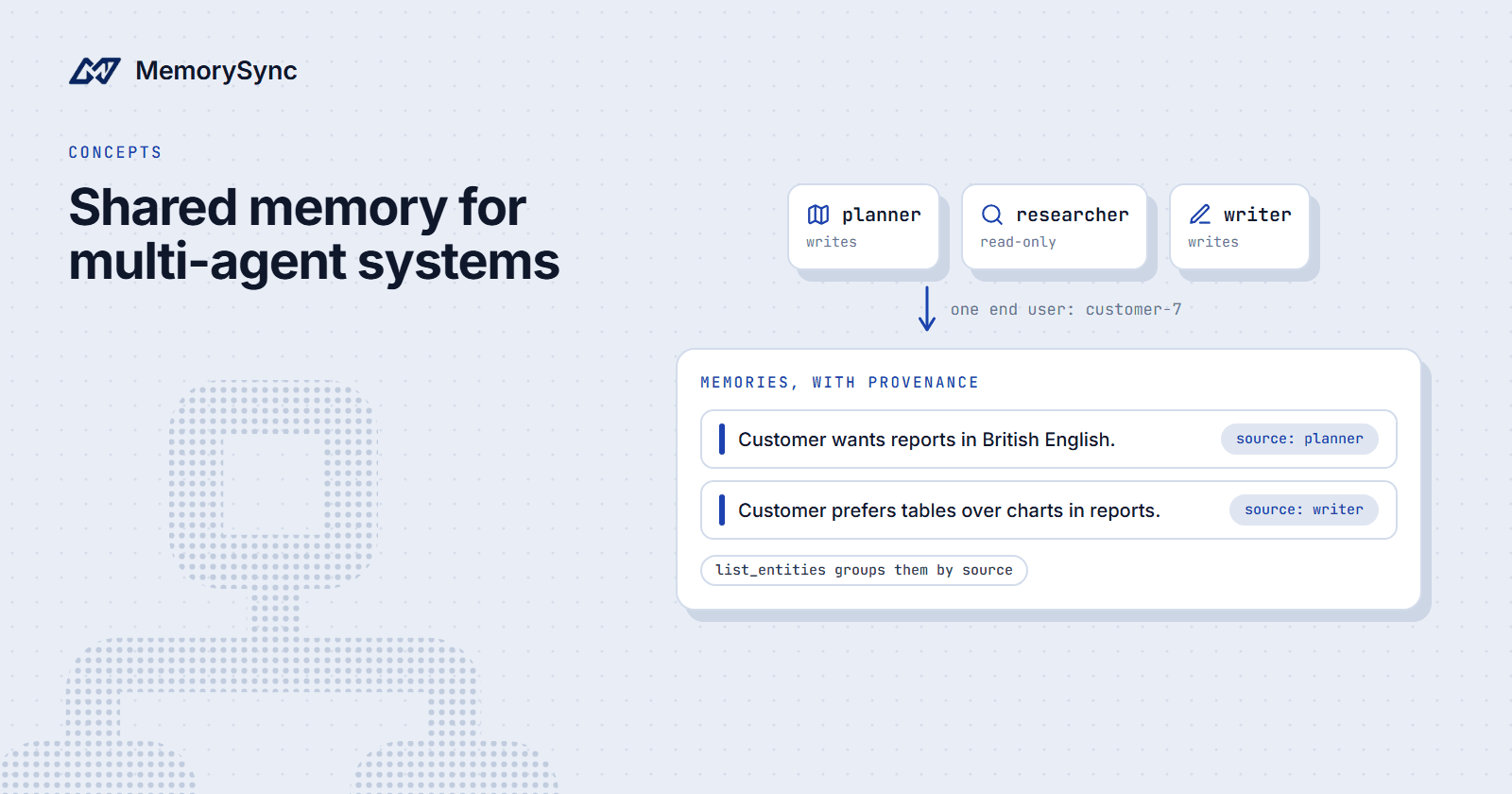
A planner agent learns that the customer wants the report in British English. The researcher never hears about it, and the writer produces American spelling. Each agent kept what it learned in its own state, and by the end of the run the three disagreed about the customer.
The same drift happens across tools. A developer tells Claude Code that the team uses pnpm, and the next morning Cursor suggests npm. In both cases the fix is one memory store that every agent reads, with clear rules about which agents write to it.
One store, scoped deliberately
Shared memory starts with the scope every agent uses. In MemorySync, each API-key call names an end user, and that id is the unit of sharing: agents that send the same id read and write the same memories.
- Per end user. Every agent working for one customer uses that customer's id, such as
customer-7, so the planner, the researcher and the writer see the same facts. - Per team. Conventions everyone should share live under a workspace-level id such as
team-engineering, the pattern the docs give for organization standards.
An agent can use both. It reads conventions with the team id and facts about the customer with the customer id, as two separate calls, so a customer's details never end up stored under the team id where every agent would see them.
The API enforces the boundary. Reads, searches and deletes are filtered to the end user, project and environment, and deduplication never crosses them, so a crew working for one customer cannot read another customer's memories by mistake.
Record which agent wrote what
With several writers, every memory needs provenance. Pass source on each write, one value per agent or tool. Use short, lowercase names defined in your code, such as planner and writer, rather than a new label for each write, so you can later group and filter by them:
from memorysync import MemorySyncClientms = MemorySyncClient(api_key="...",base_url="https://api.memorysync.io",end_user_id="customer-7",)ms.add("Customer wants reports in British English.", source="planner")
Over MCP, the list_entities tool groups a user's memories by source, extracted category or extracted type, with a count and the time of the latest memory for each group. When one agent has been writing bad facts, delete_entity removes every memory with that source. It runs as a dry run by default and reports how many memories would go; the real delete needs dry_run=false.
Preview first. Run delete_entity with the default dry run, compare the count with what list_entities reported, and only then delete for real.
Decide who may write
Shared memory gets noisy when every agent writes everything. Give each agent a role:
- Writers talk to the user or confirm outcomes. They store facts the user stated and decisions the user confirmed.
- Readers, such as a researcher or a summarizer, only need context. They get read-only access.
- Nobody writes drafts, intermediate reasoning or tool output that will be stale tomorrow.
State the rules in two places. Each agent's instructions say what it should save, and its credentials stop it from writing when the instructions are ignored.
Read-only access exists at each layer. The LangChain tools take read_only=True and then return only search_memory and list_memories. An MCP connection without write scope is not shown the write tools at all, so its agent cannot try to call them.
from langchain_memorysync import create_memorysync_toolswriter_tools = create_memorysync_tools(end_user_id="customer-7")researcher_tools = create_memorysync_tools(end_user_id="customer-7", read_only=True)
Facts-only capture keeps writes small. Every conversation-capture integration stores curated facts rather than transcripts, so an agent that saves a turn adds what the turn established instead of the whole exchange.
Concurrent writes
Agents run in parallel, retry after timeouts and repeat each other. These mechanisms keep that from corrupting shared memory:
- Idempotent writes. Send your own id for a record as
client_ref, up to 128 characters. Sending it again returns a skipped response with reasonalready_ingestedand the ids the first write produced, so a retry never stores a second copy. - Deduplication. A new fact is compared with existing memories of the same user, project, environment, type and key, and skipped at a cosine similarity of 0.9 or more. It compares meaning, so treat it as a filter rather than a guarantee.
- Replacement of one-value facts. When a new value arrives for a one-value slot such as a city, the older memory is superseded and search stops returning it. Multi-value keys keep every member, and other changes are not replaced automatically.
import hashlibfrom memorysync import AddSkippedResponsetext = "Customer prefers tables over charts in reports."ref = "crew:" + hashlib.sha256(text.encode()).hexdigest()[:32]result = ms.add(text, source="writer", client_ref=ref)if isinstance(result, AddSkippedResponse):print(result.reason) # "already_ingested" if this client_ref was sent before
The add_memory tools in the framework packages derive client_ref from a hash of the content, and the same pattern works for your own writes. A retried save of the same text is recognised, while a changed fact gets a new reference instead of being skipped as already ingested.
One memory across interfaces
Every interface reaches the same store. The REST API, the Python and TypeScript SDKs, the framework packages and the hosted MCP server read and write the same memories, so a fact a Python crew saved can show up for an MCP client working in the same scope.
In CrewAI, the crewai-memorysync package plugs into CrewAI's own memory as its storage backend. One user_id per crew gives the crew a shared knowledge base, and one per end user keeps each customer's crew memory separate:
from crewai import Crewfrom crewai.memory import Memoryfrom crewai_memorysync import MemorySyncStoragecrew = Crew(agents=[researcher, writer],tasks=[research_task, write_task],memory=Memory(storage=MemorySyncStorage(user_id="support-crew")),)crew.kickoff()
CrewAI's records are kept as framework state, and the facts in them are extracted into memories that the SDKs, MCP and the other integrations can find. Saving an identical record again stores and extracts nothing twice.
Coding agents share memory the same way. Claude Code, Cursor, Codex and VS Code connected to the hosted MCP server under one account read and write one memory, and One Memory Across Claude Code, Cursor, Codex and VS Code is the guide for that setup.
Next step
To run the CrewAI example above against your own crew, follow A Durable Memory Backend for CrewAI.