Give Claude Code a Memory That Survives Sessions
Two ways to give Claude Code memory across sessions: the MemorySync plugin, whose hooks capture and recall on their own, or the MCP server alone, where Claude calls the tools.
Published on 4 min read
On this page
Claude Code reads your repository, but it does not remember the conversation in which you explained why the queue consumer must stay single-threaded, or that you prefer small commits. A new session, or a long one after compaction, starts without it. CLAUDE.md holds what you remember to write down; most of what gets decided in a session never makes it there.
MemorySync gives Claude Code memory that survives sessions and machines. There are two ways to set it up, and the difference is who decides when memory is used.
Two options
| Plugin | MCP server only | |
|---|---|---|
| Capture | Automatic: hooks send each prompt to fact extraction | Manual: Claude calls add_memory when it decides to |
| Recall | Automatic: at session start, with prompts, after compaction | Manual: Claude calls search_memory |
| Setup | Marketplace install plus an API key | One command, browser sign-in |
| Good for | Daily use in your own repositories | Trying it out, or locked-down environments |
Install the plugin
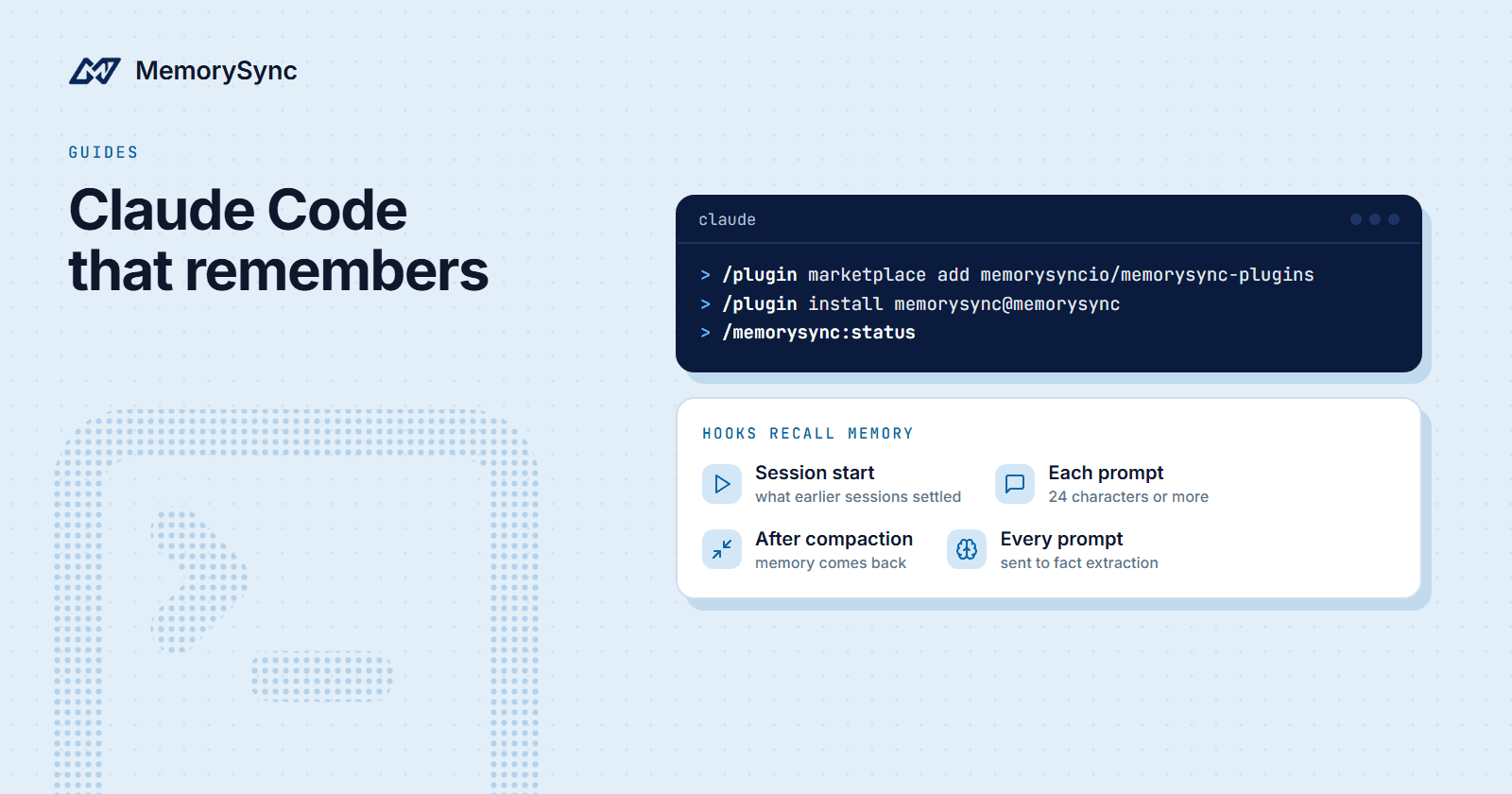
Set your API key in the shell Claude Code runs from, then install from the MemorySync marketplace inside Claude Code:
# In your shell (one time):export MEMORYSYNC_API_KEY=ms_...# In Claude Code:/plugin marketplace add memorysyncio/memorysync-plugins/plugin install memorysync@memorysync# Verify:/memorysync:status
The plugin needs Claude Code 2.0 or newer and Node.js 18+ on your PATH, because its hooks are small Node scripts. They run natively on Windows, macOS and Linux.
What the hooks do
Claude Code exposes lifecycle hooks, and the plugin uses them so memory does not depend on the model choosing to call a tool:
- When you send a prompt, the hook sends it to fact extraction. Only the durable facts in it are stored. Claude's replies are not sent.
- At session start, relevant memories are injected so the session begins with what earlier sessions established.
- With each prompt of 24 characters or more, memories relevant to that prompt are injected alongside it. Short prompts such as "yes" or "run it" skip the lookup.
- After context compaction, recall runs again, so a long session does not lose its memory when Claude Code summarises the conversation.
Facts are tagged with the git repository, worktree-aware, so a decision about one codebase is recalled in that codebase. Your personal preferences, such as how you like commits written, follow you across repositories.
Every hook exits 0 on every failure. If MemorySync is unreachable, the session carries on without memory rather than breaking.
Three commands are available when you want to be explicit:
/memorysync:statuschecks the key and the connection./memorysync:remembersaves something you want kept, in your words./memorysync:recallsearches memory on demand.
The plugin also bundles the MemorySync MCP server and the docs server, plus skills that teach Claude how to integrate MemorySync correctly when you ask it to build with the API.
MCP only
If you prefer to keep hooks out of your environment, register the memory server alone:
claude mcp add --transport http memorysync https://mcp.memorysync.io/mcp
Claude Code speaks Streamable HTTP directly and runs the browser sign-in itself on the first tool call. After that, Claude has the memory tools, including search_memory, add_memory, list_memories and delete_memory, and uses them when it judges them useful. Adding a line to CLAUDE.md such as "search MemorySync before starting a task and save decisions we agree on" makes that judgement much more consistent.
The docs server is worth adding in either setup, so Claude writes MemorySync code from the current documentation:
claude mcp add --transport http memorysync-docs https://docs.memorysync.io/mcp
What ends up in memory
Extraction keeps facts and drops conversation. A prompt like "let's keep the consumer single-threaded, the vendor API rate-limits per connection" is worth keeping as a fact about the project. "Run the tests again" has nothing durable in it and stores nothing.
Two habits keep memory useful:
- Say the reason. "We pin the client to 2.x because 3.0 changed retry semantics" recalls better, and ages better, than "pin the client".
- Keep secrets out of prompts. Anything you type can become a fact. Paste keys into environment files, not into the chat.
To see or correct what is stored, ask Claude to list recent memories, or open Memory Explorer in the dashboard. Deleting through MCP asks for confirmation first.
Claude Cowork and other surfaces
The same plugin runs in Claude Cowork cloud sessions through repository-declared settings, with an API key set in the cloud environment. Claude Desktop's local Cowork tab does not run plugin hooks; use the MCP server there, configured through mcp-remote because Claude Desktop launches servers as local processes.
Hooks are what make capture automatic. Wherever a surface does not run them, memory still works through the MCP tools, but only when Claude calls them.
Next step
The Claude Code guide covers the settings file for Cowork and the environment variables the hooks read. If you also use Cursor, Persistent Memory in Cursor over MCP connects it to the same memory.