Memory for the Vercel AI SDK in One Middleware
Wrap any AI SDK model once with memorysync-ai-sdk: relevant memories go in before generation, the user's new facts are saved after, streaming included, on AI SDK v6 and v7.
Published on 4 min read
On this page
The Vercel AI SDK makes the model call easy and leaves memory to you. The usual result is a retrieval call before generateText, a write after it, and the same two calls copied into every route that talks to a model.
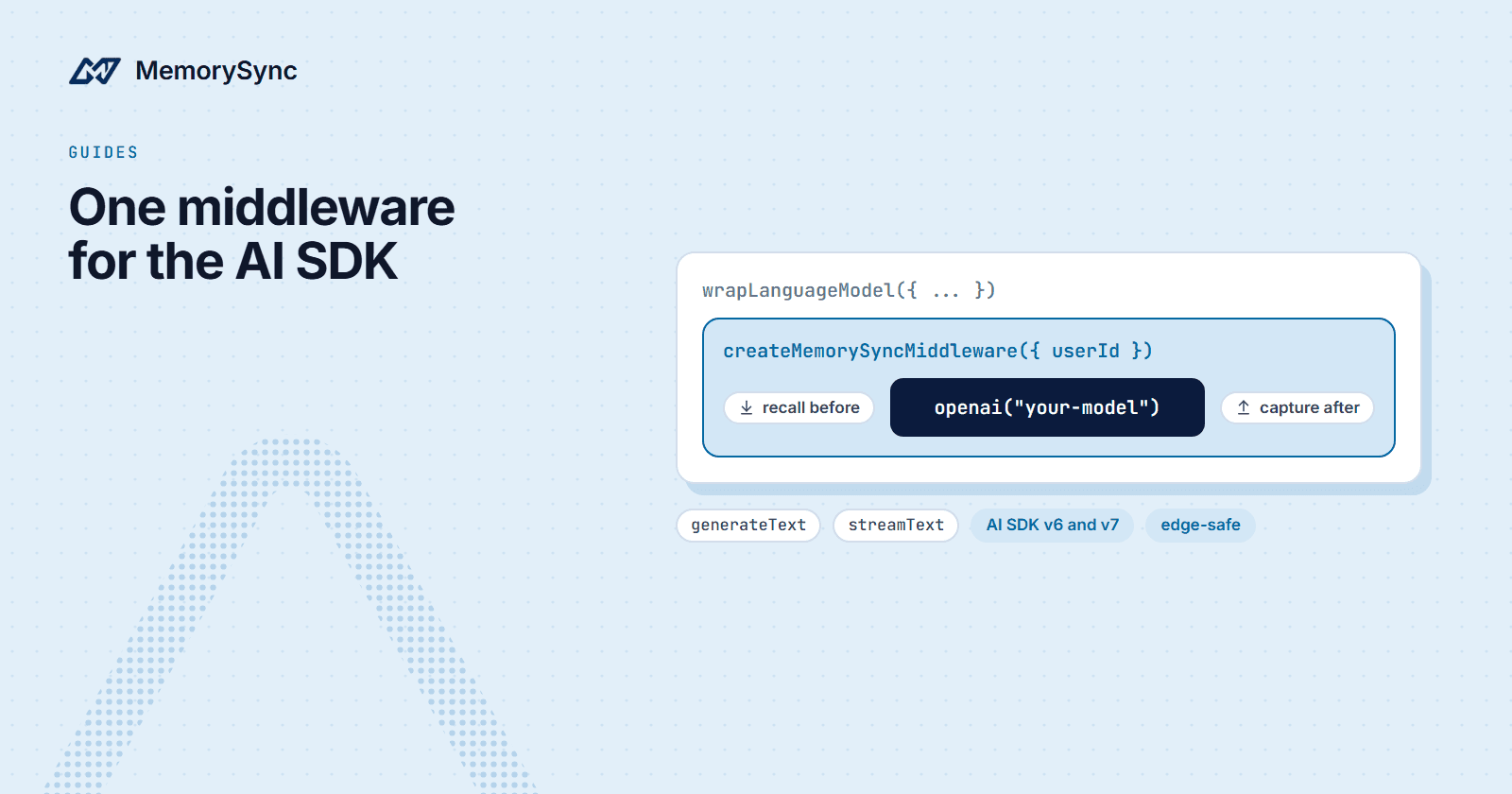
The memorysync-ai-sdk package moves both into language-model middleware. You wrap the model once with wrapLanguageModel, and every generateText or streamText call through it recalls the user's memories before generation and sends their message for fact extraction afterwards. Call sites do not change.
Install
npm install memorysync-ai-sdk ai @ai-sdk/openaiexport MEMORYSYNC_API_KEY=ms_...
The package has no LLM dependency of its own, so any AI SDK provider works. It needs the ai package v6 or newer and Node 18+; ai v7 itself requires Node 22+. One build supports both majors.
Wrap the model
import { generateText, wrapLanguageModel } from "ai";import { openai } from "@ai-sdk/openai";import { createMemorySyncMiddleware } from "memorysync-ai-sdk";const model = wrapLanguageModel({model: openai("your-model"),middleware: createMemorySyncMiddleware({userId: "customer-7", // the end user, requiredsessionId: "thread-42", // groups the stored facts by thread}),});// First conversationawait generateText({ model, prompt: "I'm vegetarian and I fly aisle." });// Any later call: same user, any process, any providerconst { text } = await generateText({model,prompt: "Book my trip: flight plus a dinner spot.",});
By the second call the model has already seen that the user is vegetarian and flies aisle, because the middleware put those memories into the prompt.
What the middleware does on each call
- Before generation it searches the user's memories with their message and injects the relevant ones into the prompt.
- The model runs exactly as it would without the middleware.
- After the user turn it sends the user's message for fact extraction. Only the durable facts in it are stored. Assistant replies are not.
The capture happens once per user turn. In a tool loop, where the SDK calls the model several times for one user message, the intermediate steps send nothing.
Streaming is handled the same way. With streamText, the message is sent once the stream finishes, and an aborted stream sends nothing, so a user who cancels a reply does not leave a half-turn behind.
The memories that were recalled are exposed on the result's providerMetadata, which is the place to look when you want to log what the model was given.
Middleware failures are reported rather than thrown. If MemorySync cannot be reached, the call goes ahead without memory instead of failing the request.
A streaming chat route
In a Next.js App Router route, build the wrapped model per request with the signed-in user's id. Take that id from your session on the server, never from the request body in production.
// app/api/chat/route.tsimport { convertToModelMessages, streamText, wrapLanguageModel } from "ai";import { openai } from "@ai-sdk/openai";import { createMemorySyncMiddleware } from "memorysync-ai-sdk";export async function POST(req: Request) {const { messages, sessionId } = await req.json();const userId = await currentUserId(); // your auth, on the serverconst model = wrapLanguageModel({model: openai("your-model"),middleware: createMemorySyncMiddleware({ userId, sessionId }),});const result = streamText({model,messages: await convertToModelMessages(messages),});return result.toUIMessageStreamResponse();}
The package is edge-safe, with no Node-only imports, so the same route runs on the Edge runtime.
Helpers for hand-wired setups
If you would rather control each step, the same package exports the pieces the middleware uses:
import { streamText } from "ai";import {createMemorySyncOnFinish,getMemoryContext,saveTurn,searchMemories,} from "memorysync-ai-sdk";// A prompt-ready context block ("" for a new user)const context = await getMemoryContext("what should I cook?", {userId: "customer-7",});// Scored resultsconst hits = await searchMemories("dietary preferences", { userId: "customer-7" });// Explicit persistence. This one throws on failure.await saveTurn({ user: "I'm vegetarian", assistant: "Noted!", sessionId: "thread-42" },{ userId: "customer-7" },);// Or persist from onFinish, once after the full tool loopconst result = streamText({model,prompt,onFinish: createMemorySyncOnFinish({ userId: "customer-7", user: prompt }),});
Note the difference in failure behaviour. The middleware never throws, because memory should not break a chat. saveTurn throws, because when you call it explicitly you are owed the truth about whether it worked.
Memory tools for agents
For agents that should decide what to remember, memorySyncTools returns structured tools you spread into tools:
import { generateText, stepCountIs } from "ai";import { openai } from "@ai-sdk/openai";import { memorySyncTools } from "memorysync-ai-sdk";const { text } = await generateText({model: openai("your-model"),tools: { ...memorySyncTools({ userId: "customer-7" }) },stopWhen: stepCountIs(5),prompt: "Remember that I prefer aisle seats.",});// Agents you do not fully trust: search and list onlymemorySyncTools({ userId: "customer-7", readOnly: true });
Like the middleware, the tools never throw. A failure comes back as a result the model can read and work around.
Things to get right
- One end user per request. The
userIdyou pass is the scope for both recall and capture. Use a stable, opaque id from your own system. - Keep the key on the server. The middleware runs where your route runs. Browser code should never see
MEMORYSYNC_API_KEY. - Do not double-capture. If you use the middleware, do not also call
saveTurnfor the same messages.
Next step
The Vercel AI SDK guide lists every middleware option. If you built your chatbot with the plain TypeScript SDK, Add Memory to a Next.js Chatbot shows the hand-wired version for comparison.