Persistent Memory in Cursor over MCP
Connect Cursor to the MemorySync MCP server so decisions, conventions and gotchas survive between chats, with a project rule that tells Cursor when to save and recall.
Published on 5 min read
On this page
Every new Cursor chat starts without what you settled last week. You agreed that API timestamps are UTC ISO-8601, you pinned a library after a breaking release, and you found the one test that flakes on Windows. A rules file can hold standing conventions, but you write it by hand and it does not grow from the work.
This guide connects Cursor to the hosted MemorySync MCP server, so Cursor can save what a session established and search it in the next one. Nothing runs on your machine: both servers are remote, and Cursor talks to them over Streamable HTTP.
What you are adding
Two servers, configured side by side:
- Memory at
https://mcp.memorysync.io/mcp. It gives Cursor tools such assearch_memory,add_memory,list_memoriesanddelete_memory, scoped to your account. - Docs at
https://docs.memorysync.io/mcp. It needs no sign-in and exposessearch_docs,read_docandlist_doc_sections, so when Cursor writes MemorySync code it reads the current documentation instead of guessing method names.
The memory server has 15 tools in total, including ones to inspect what is stored and to check whether a new memory is searchable yet. They are listed further down.
Add the servers
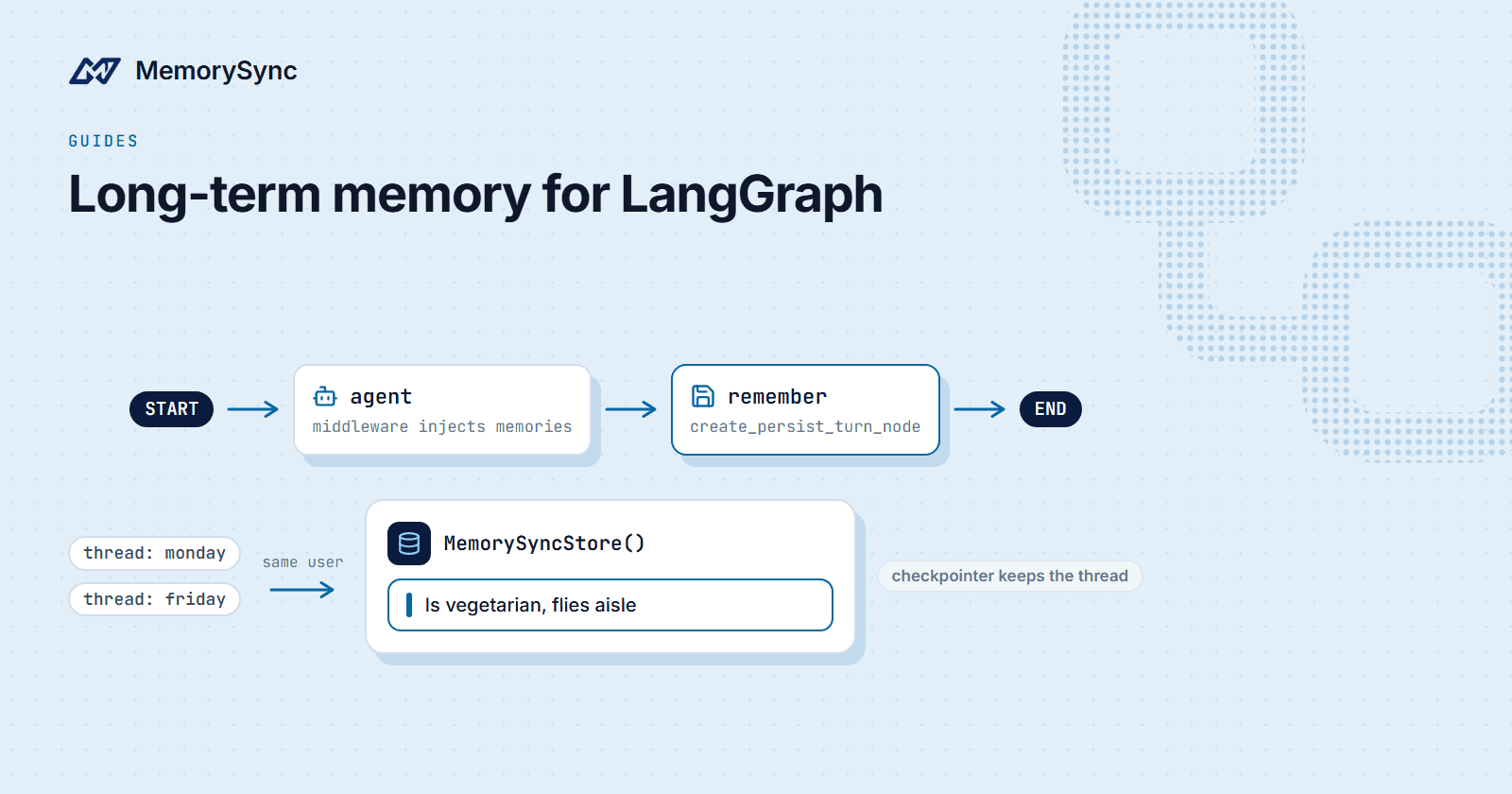
Put this in ~/.cursor/mcp.json to use memory in every project, or in .cursor/mcp.json inside one repository:
{"mcpServers": {"memorysync": {"url": "https://mcp.memorysync.io/mcp"},"memorysync-docs": {"url": "https://docs.memorysync.io/mcp"}}}
Cursor names the field url. Other clients use different shapes (VS Code nests servers under servers, the legacy Windsurf agent uses serverUrl), and a config in the wrong shape parses without an error and then never connects. If a server does not appear in Cursor's MCP settings, check the shape first.
You can also let the installer write the file. It detects Cursor's config, adds both servers and leaves anything else in the file alone:
# Preview the change without writing anythingnpx -y memorysync-mcp-install --client cursor --dry-run# Write itnpx -y memorysync-mcp-install --client cursor# Undo laternpx -y memorysync-mcp-install --client cursor --remove
Sign in once
The first time Cursor calls a memory tool, the server answers 401 with a WWW-Authenticate header that names its protected-resource metadata. Cursor follows that to the authorization server, registers itself as a client and opens a browser sign-in. This is OAuth 2.1 with PKCE and dynamic client registration, so there is no client id or secret to copy anywhere.
After you sign in, the memory server acts for your account. Two tools help when something looks wrong:
whoamireports how the connection is authenticated and whether it can write and delete.list_connected_sourcesshows which knowledge sources your workspace has connected, such as GitHub or Notion, and when each last synced.
Tools a connection is not allowed to use are not advertised at all. If you see search tools but no add_memory, the connection lacks write access rather than being broken.
Tell Cursor when to use memory
Cursor decides when to call a tool. Without guidance it rarely saves anything and sometimes forgets to search. A project rule fixes both. The starter repository ships one as .cursorrules; this is a shorter version of the same idea:
# MemoryAt the start of a task, search MemorySync for decisions and conventionsthat apply to this repository, and follow them instead of re-deciding.Save a memory, after asking me, when we settle something durable:- an architecture decision and the reason for it- a project convention (formats, naming, error handling)- a non-obvious bug fix or a pinned dependency and why- non-sensitive configuration the code depends onNever save secrets, tokens, private keys or customer data.When you write MemorySync integration code, search memorysync-docs first.
Asking before saving matters. A memory is easy to write and easy to forget about, and a wrong one keeps influencing answers until someone deletes it.
What to store, and what to leave out
add_memory sends the text through extraction, so conversational filler is discarded and near-duplicates are merged. A skipped result is normal: it means there was nothing durable in the text, not that the call failed.
Memories that pay off later are short and specific:
- "API responses use UTC ISO-8601 timestamps; never local time."
- "The billing service talks to the payments provider only through
billing/gateway.py." - "Integration tests that touch the file watcher are skipped on Windows CI because of path-length limits."
Leave out anything secret, anything you would not paste into a ticket, and anything that is only true for the next hour. Large code blocks belong in the repository, not in memory.
Inspect and clean up
You can ask Cursor to run these tools directly, which is often faster than opening the dashboard:
| Tool | Use it to |
|---|---|
list_memories | See the most recent memories without searching |
search_memory | Check what a query returns before relying on it |
get_event_status | Confirm a new memory is searchable, instead of adding it again |
list_memory_events | Read the log of adds, forgets and imports, newest first |
delete_memory | Remove a memory by id, after confirming with you |
delete_all_memories | Count everything in scope (a dry run by default) before an explicit wipe |
Destructive tools preview by default. delete_all_memories only deletes when it is called with dry_run=false and an exact confirmation string, so a model cannot erase your memory on a misread instruction.
Troubleshooting
- The server never connects. Check the config shape and that the file is valid JSON. Cursor reads
url, notserverUrl. - No sign-in window. Make sure the URL is exactly
https://mcp.memorysync.io/mcp. A typo leaves Cursor nothing to discover. - Searches come back empty after a save. Call
get_event_statuswith the idadd_memoryreturned. A memory is searchable once its embedding is written. - Results stop arriving mid-month. At a free or paid plan's monthly limit, tools return empty results rather than errors, so Cursor never tells you about billing in the middle of a task. Check usage in the dashboard.
Next step
Clone the Cursor starter for a working .cursor/mcp.json and the full rules file, then read the Cursor guide for the remaining options.