Long-Term Memory for LangGraph Agents
Give a LangGraph agent memory that crosses threads: a BaseStore backed by MemorySync, context injected before each model call, and facts saved from what the user says.
Published on 4 min read
On this page
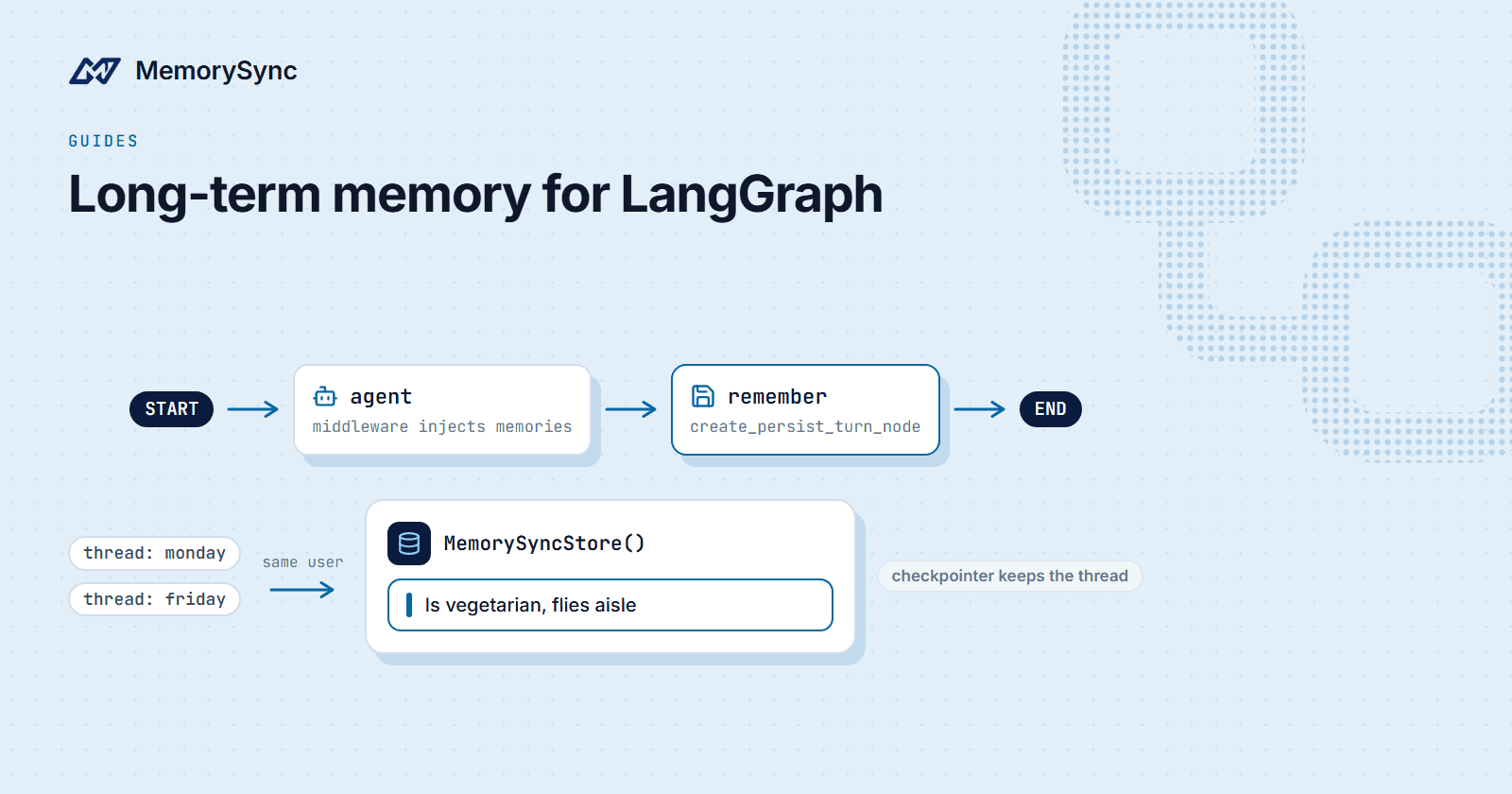
LangGraph draws a clear line between two kinds of persistence. A checkpointer saves the state of one thread so a conversation can pause and resume. A store holds what the agent should know across threads: that this user is vegetarian, flies aisle, and booked Lisbon last time.
The checkpointer half is well served by LangGraph's own Postgres and SQLite checkpointers. This guide covers the other half. The LangGraph surface of langchain-memorysync gives you a real BaseStore implementation, a way to inject a user's memories before every model call, a node that saves the durable facts in each user message, and a search tool.
Install
# Pythonpip install "langchain-memorysync[langgraph]"# Node.jsnpm install memorysync-langchain @langchain/langgraphexport MEMORYSYNC_API_KEY=ms_...
Python needs langgraph 1.2 or newer; Node.js needs @langchain/langgraph 0.2 or newer. Python and Node.js share one wire format, so data written by one can be read by the other.
A store that outlives the process
MemorySyncStore implements LangGraph's BaseStore, so anything that accepts a store accepts it. Values are kept per namespace and key, apart from the user's memories, with one live value per key. Search works by meaning with no embedding configuration on your side.
from langchain_memorysync.langgraph import MemorySyncStorestore = MemorySyncStore() # MEMORYSYNC_API_KEY from the environmentstore.put(("memories", "user-1"), "diet", {"text": "vegetarian"})item = store.get(("memories", "user-1"), "diet")print(item.value) # {'text': 'vegetarian'}hits = store.search(("memories", "user-1"), query="what do they eat?")print(hits[0].value, hits[0].score)# Filters use the same operators as LangGraph's own stores.store.search(("memories", "user-1"), filter={"confidence": {"$gte": 0.8}})
Compile it into a graph with store=, and tools reach it through get_store():
from langchain.agents import create_agentfrom langchain_core.tools import toolfrom langgraph.config import get_storefrom langchain_memorysync.langgraph import MemorySyncStore@tooldef save_preference(key: str, value: str) -> str:"""Save a user preference to long-term memory."""get_store().put(("memories", "user-1"), key, {"text": value})return f"Saved {key}."@tooldef recall_preferences(query: str) -> str:"""Search the user's long-term memory."""hits = get_store().search(("memories", "user-1"), query=query)return "\n".join(h.value["text"] for h in hits) or "Nothing stored yet."agent = create_agent(model,tools=[save_preference, recall_preferences],store=MemorySyncStore(),)
Inject memories before the model runs
Tools only help when the model thinks to call them. For personalisation you usually want the relevant memories in front of the model on every turn. There are two ways to do that, one per agent constructor:
# create_agent: the middleware patternfrom langchain.agents import create_agentfrom langchain_memorysync.langgraph import MemorySyncMemoryMiddlewareagent = create_agent(model,tools=tools,middleware=[MemorySyncMemoryMiddleware(user_id="customer-7")],)# create_react_agent: the pre-model hookfrom langgraph.prebuilt import create_react_agentfrom langchain_memorysync.langgraph import create_memorysync_pre_model_hookagent = create_react_agent(model,tools,pre_model_hook=create_memorysync_pre_model_hook(user_id="customer-7"),)
The middleware is Python only. The pre-model hook exists in both languages.
Save what the user said
In a graph you build yourself, add a persist node after the model. It sends the latest user message to fact extraction, so the durable facts in it become memories for that user.
from langgraph.graph import StateGraph, MessagesState, START, ENDfrom langchain_memorysync.langgraph import create_persist_turn_noderemember = create_persist_turn_node(user_id="customer-7")graph = StateGraph(MessagesState)graph.add_node("agent", call_model)graph.add_node("remember", remember)graph.add_edge(START, "agent")graph.add_edge("agent", "remember")graph.add_edge("remember", END)app = graph.compile()app.invoke({"messages": [("user", "I always fly aisle.")]},config={"configurable": {"thread_id": "trip-1"}},)
The session defaults to the graph's thread_id, so facts are grouped by conversation without extra wiring. LangGraph re-runs nodes and retries model calls; a re-run persist node is recognised, so nothing is extracted twice.
Two threads, one user
Everything together: the middleware injects context and, with auto_persist=True, saves the user's facts after each turn. The second conversation starts on a fresh thread, possibly in a fresh process, and the model already sees what the first one established.
from langchain.agents import create_agentfrom langchain_openai import ChatOpenAIfrom langchain_memorysync.langgraph import (MemorySyncMemoryMiddleware,MemorySyncStore,create_memory_search_tool,)USER = "customer-7"agent = create_agent(ChatOpenAI(model="your-model"),tools=[create_memory_search_tool(user_id=USER)],middleware=[MemorySyncMemoryMiddleware(user_id=USER, auto_persist=True)],store=MemorySyncStore(),)# Mondayagent.invoke({"messages": [{"role": "user", "content": "I'm vegetarian and I fly aisle."}]},config={"configurable": {"thread_id": "monday"}},)# Friday: a new threadout = agent.invoke({"messages": [{"role": "user", "content": "Book my trip: flight plus a dinner spot."}]},config={"configurable": {"thread_id": "friday"}},)print(out["messages"][-1].content)
create_memory_search_tool gives the model a search it can call when the injected context is not enough. Like the other tools in these packages, it never raises: a failure comes back as text the model can read.
Where the checkpointer fits
This integration is the long-term half. It does not replace a checkpointer, and you should keep one for thread state: the message list, interrupts and in-flight tool calls. A common setup is langgraph-checkpoint-postgres for threads and MemorySyncStore plus the middleware for what crosses them.
| Concern | Where it lives |
|---|---|
| Messages and state of one thread | Your checkpointer |
| Facts and preferences across threads | MemorySync memories, via the middleware or persist node |
| Values your tools put and get by key | MemorySyncStore |
Store deletes need a key with delete permission. Everything else needs read and write.
Next step
The LangGraph guide documents each option, including the Node.js equivalents. If your app also uses plain LangChain chains, Persistent Memory for LangChain covers the chat history class from the same package.