Persistent Memory for LangChain
Keep LangChain chat history across restarts, add what users told you in past sessions to the system prompt, and give agents memory tools, with langchain-memorysync.
Published on 4 min read
On this page
A LangChain chatbot built on RunnableWithMessageHistory remembers a conversation only as long as its history store does. The in-memory store is gone when the process restarts, and a database you wire up yourself still holds only the transcript of each thread. What a user said in last week's thread never reaches this week's prompt.
The langchain-memorysync package (and memorysync-langchain for Node.js) closes both gaps. It gives you a chat history class backed by MemorySync, a context provider that returns what you know about a user from every past session, and a set of memory tools for agents.
Install
# Pythonpip install langchain-memorysync# Node.jsnpm install memorysync-langchain @langchain/coreexport MEMORYSYNC_API_KEY=ms_...
The classes read MEMORYSYNC_API_KEY from the environment, so the samples below do not pass a key. Use a key with read and write scopes.
Chat history that survives a restart
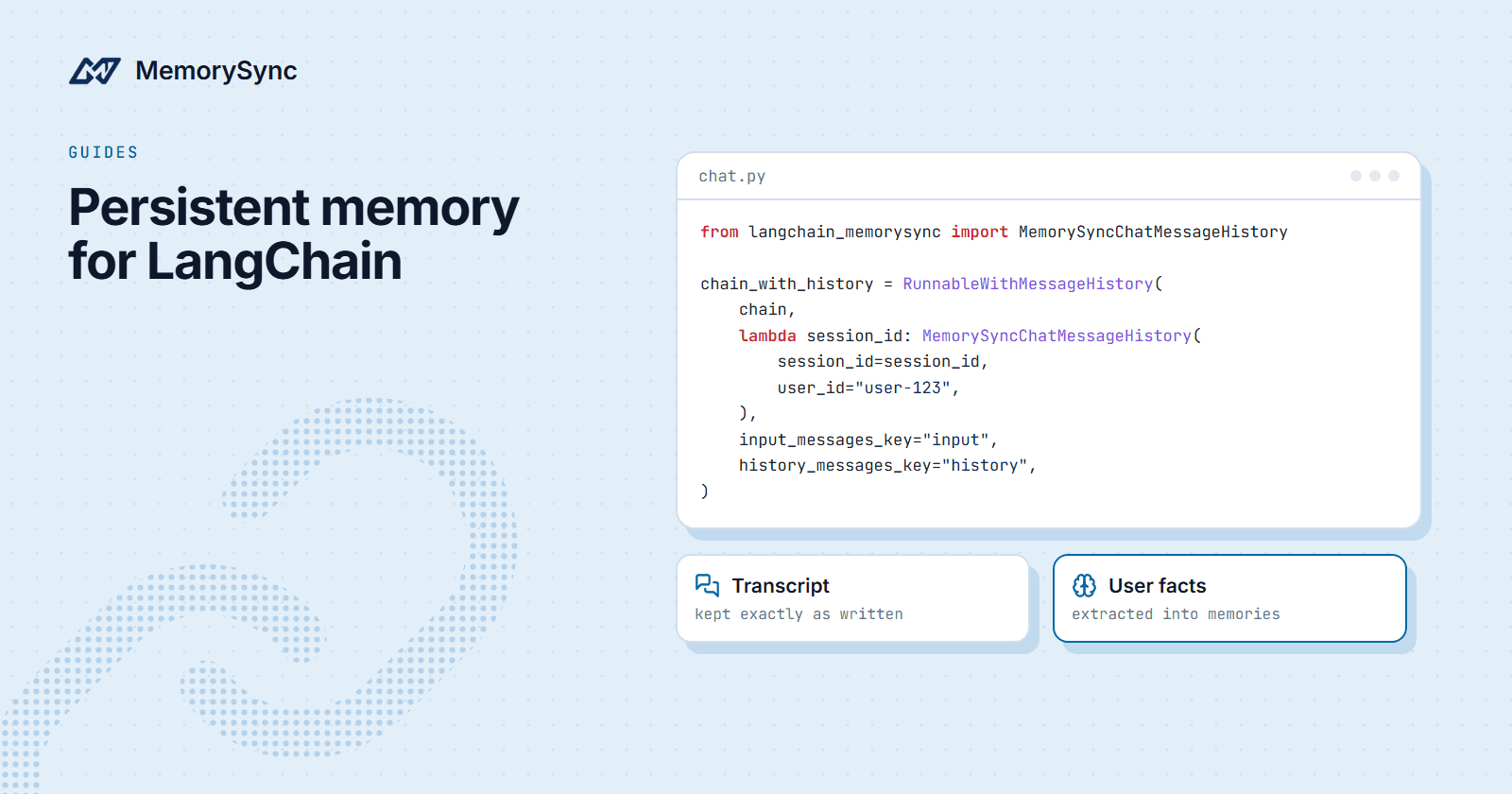
Hand RunnableWithMessageHistory a MemorySync-backed history per session. Each exchange is written when the chain finishes the turn and read back in order, so a restarted process resumes where the conversation left off.
from langchain_core.runnables.history import RunnableWithMessageHistoryfrom langchain_memorysync import MemorySyncChatMessageHistorychain_with_history = RunnableWithMessageHistory(chain,lambda session_id: MemorySyncChatMessageHistory(session_id=session_id,user_id="user-123",),input_messages_key="input",history_messages_key="history",)chain_with_history.invoke({"input": "My name is Ada."},config={"configurable": {"session_id": "thread-42"}},)
Two things happen to each turn, and they are kept apart:
- The transcript is kept as written. Short replies such as "Noted." survive exactly, and the transcript is never listed or searched as memories.
- The user's messages go to fact extraction. Durable facts in them ("My name is Ada") become memories for
user-123. Assistant replies stay in the transcript only.
That split is what makes clear() safe: it deletes the session's transcript, and the facts extracted from it stay. Clearing needs a key with delete permission.
The Node.js class takes the same options in camelCase:
import { RunnableWithMessageHistory } from "@langchain/core/runnables";import { MemorySyncChatMessageHistory } from "memorysync-langchain";const chainWithHistory = new RunnableWithMessageHistory({runnable: chain,getMessageHistory: (sessionId) =>new MemorySyncChatMessageHistory({ sessionId, userId: "user-123" }),inputMessagesKey: "input",historyMessagesKey: "history",});await chainWithHistory.invoke({ input: "My name is Ada." },{ configurable: { sessionId: "thread-42" } },);
What the user said in other sessions
History covers one thread. For everything else you know about the user, the context provider returns a grouped, type-labelled block ready to place in a system prompt. It returns an empty string for a user with no relevant memories, because a new user is a normal state and not an error.
from langchain_memorysync import MemorySyncContextProviderprovider = MemorySyncContextProvider(user_id="user-123")context = provider.get_context("What should I cook tonight?")
Each get_context call is one retrieval. Call it once per turn with the user's message, not once per chain step.
A complete chatbot
Both pieces in one program: the transcript per thread, the long-term context in the system prompt, and any chat model in the middle. Stop the process, start it again, and the conversation resumes, with what the user said in earlier threads already in the prompt.
from langchain_core.prompts import ChatPromptTemplate, MessagesPlaceholderfrom langchain_core.runnables.history import RunnableWithMessageHistoryfrom langchain_openai import ChatOpenAIfrom langchain_memorysync import (MemorySyncChatMessageHistory,MemorySyncContextProvider,)USER_ID = "customer-7"llm = ChatOpenAI(model="your-model")provider = MemorySyncContextProvider(user_id=USER_ID)prompt = ChatPromptTemplate.from_messages([("system","You are a helpful travel assistant.\n""Relevant memories about this user:\n{memories}",),MessagesPlaceholder(variable_name="history"),("human", "{input}"),])chat = RunnableWithMessageHistory(prompt | llm,lambda session_id: MemorySyncChatMessageHistory(session_id=session_id,user_id=USER_ID,max_messages=30,),input_messages_key="input",history_messages_key="history",)def chat_turn(text: str, session_id: str) -> str:memories = provider.get_context(text) or "None yet."reply = chat.invoke({"input": text, "memories": memories},config={"configurable": {"session_id": session_id}},)return reply.content
max_messages=30 caps how much of the transcript goes back into the prompt. Older turns stay stored; they just stop costing tokens on every call.
Memory tools for agents
Sometimes you want the agent to decide what to remember. create_memorysync_tools returns five structured tools with the same names in Python and Node.js: add_memory, search_memory, list_memories, update_memory and delete_memory.
from langchain.agents import create_agentfrom langchain_memorysync import create_memorysync_toolstools = create_memorysync_tools(end_user_id="user-123")agent = create_agent(model, tools=tools)agent.invoke({"messages": [{"role": "user", "content": "Remember that I'm allergic to peanuts."}]})
A few behaviours are deliberate:
- Tools never raise. A failure comes back as a readable string, so a memory outage cannot abort an agent run.
- Saves are idempotent. An agent that repeats a step is recognised instead of creating a duplicate.
- Scope is fixed per tool set. A delete cannot reach another end user's memories.
- Text is immutable.
update_memorychanges tags and importance. Replacing a fact is a delete plus an add.
For an agent you do not fully trust, such as one that reads untrusted documents, build the tools with read_only=True. You get only search_memory and list_memories.
tools = create_memorysync_tools(end_user_id="user-123",read_only=True, # only search_memory and list_memories)
Requirements and limits
langchain-core0.3 or newer, including 1.x, in both languages. Python 3.10+ and Node 18+.clear()anddelete_memoryneed a key with delete permission. Anonymous evaluation keys can write and read history but cannot clear it.- These classes keep the user's scope fixed for the lifetime of the object. On a server that handles many users, create the history or provider per request with that request's end user.
Next step
The LangChain guide covers every option of the history class and the context provider, and the LangChain tools guide covers the agent tools. If you are starting from a plain Python agent instead, see Add Long-Term Memory to a Python Agent.