Migrate From Mem0, Zep or Supermemory With a Dry Run
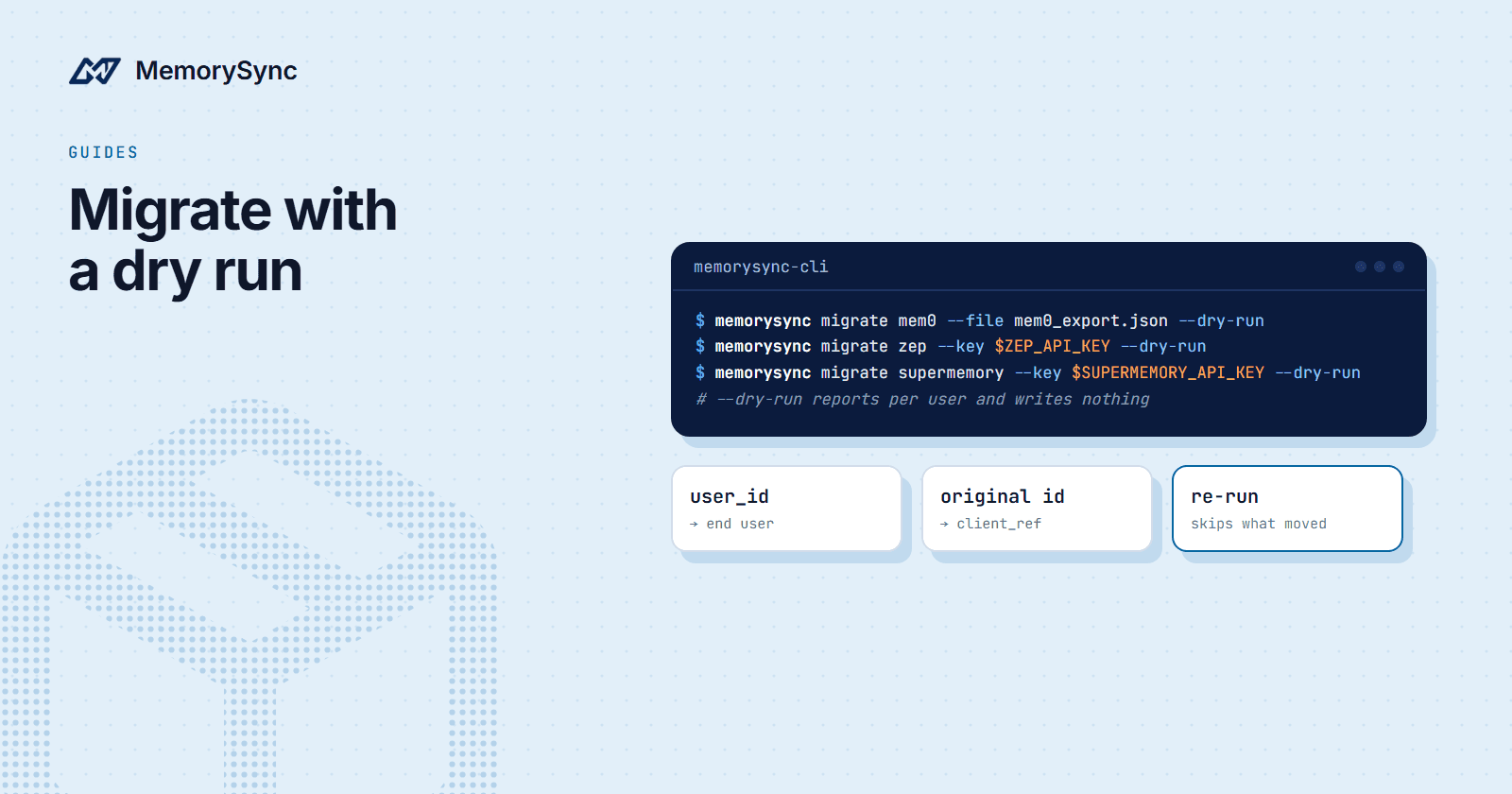
Move existing memories into MemorySync with one CLI command per provider: preview with --dry-run, land each record under its own end user, and re-run safely.
Published on 4 min read
On this page
Moving memory between providers has one way to go badly wrong that is easy to miss: records land in the wrong scope. An export usually holds many users. If they all end up under one end user, or under none, the import reports success and every user's assistant quietly forgets them.
The MemorySync CLI has a migrate command for Mem0, Zep and Supermemory that is built around that risk. It groups records by the user they belong to, writes each group into that user's scope, refuses records it cannot place, and shows you all of it with --dry-run before it writes anything.
Install the CLI
The Node and Python CLIs are interchangeable and share stored keys. Use whichever runtime you have:
# Nodenpx memorysync-cli --help# Pythonpipx run --spec memorysync-cli memorysync --help
Run memorysync init once to store your MemorySync key, or set MEMORYSYNC_API_KEY in the environment, which is the better choice in CI. When you pull directly from the old provider's API, its key is passed separately with --key.
From Mem0
Start from a Mem0 export file, or let the CLI read the account directly with your Mem0 key:
# See what would happen. Writes nothing.memorysync migrate mem0 --file mem0_export.json --dry-run# Do it.memorysync migrate mem0 --file mem0_export.json# Or pull straight from Mem0 (your Mem0 key, not your MemorySync one):memorysync migrate mem0 --key $MEM0_API_KEY --dry-runmemorysync migrate mem0 --key $MEM0_API_KEY --source-user alice
What the command guarantees:
- Records are grouped by their Mem0 `user_id` and each group is written under that end user.
- Every Mem0 id is sent as `client_ref`. Re-running is safe: records that already landed are reported as already migrated instead of being stored twice, so a run that stopped halfway is finished by running it again.
- A record whose user cannot be determined is refused, not filed in a fallback scope where nobody would look. Pass
--source-user <id>to state the scope, or re-export withuser_id. - Nothing is discarded. Mem0
categoriesbecome tags, andid,created_at,agent_id,app_idandrun_idare kept in metadata, so the two systems stay reconcilable onmetadata.mem0_id. - Writes are batched at 50 records per request, the limit bulk add enforces.
One detail to plan for: Mem0's created_at is kept as metadata.mem0_created_at, and MemorySync assigns its own created_at. Recency feeds ranking, so back-dating would push every migrated memory below anything written afterwards. Sort or filter on the metadata field when you need the original order.
From Zep
The CLI reads a Zep export, or walks your account through the API, users first and then each user's episodes:
memorysync migrate zep --file zep_export.json --dry-runmemorysync migrate zep --file zep_export.json# Through the API, with your Zep key:memorysync migrate zep --key $ZEP_API_KEY --dry-run# Only what the human said, not the assistant:memorysync migrate zep --key $ZEP_API_KEY --role user# One user at a time:memorysync migrate zep --key $ZEP_API_KEY --source-user user_123
- Episodes are migrated, not the derived graph. Zep keeps episodes verbatim alongside the graph it builds from them. The episodes are the source; the graph has no equivalent here.
- Each episode lands under its own user, and the Zep thread id becomes
session_id. The user is the isolation boundary; the session only narrows a query. - Both sides of the conversation are sent by default, and the dry run reports the user and assistant split.
--role userkeeps only what the human said, which usually retrieves better. - `json` and `fact_triple` episodes are skipped and counted, because a serialised graph edge or a business record does not read as a memory.
--include-source json,fact_triplemigrates them anyway. - Deleted users are skipped. Their data is what someone asked you to remove.
- Every episode uuid is sent as `client_ref`, so re-runs are safe here too.
From Supermemory
memorysync migrate supermemory --file supermemory_export.json --dry-runmemorysync migrate supermemory --file supermemory_export.json# Through the API, with your Supermemory key:memorysync migrate supermemory --key $SUPERMEMORY_API_KEY --dry-run# If your scope tags use a different convention:memorysync migrate supermemory --key $SUPERMEMORY_API_KEY --scope-tag-prefix tenant_
Supermemory uses container tags both as the isolation boundary and as labels. The CLI treats the tag starting with user_ as the end user and every other tag as a label, and --scope-tag-prefix changes the prefix. A document matching two scope tags, or none, is refused and named in the report. A document's summary is never stored in place of its content, and documents still being processed at the source are skipped and counted.
What a migrated record becomes
Every record goes through the same fact extraction as any other write. A long note can become several memories, and small talk becomes none. A one-value fact, such as where someone lives, is replaced when a newer value arrives, rather than kept beside the old one.
That is also why importing fewer, better records works best. A provider that stored whole turns hands you a lot of text that is not a fact worth keeping. The dry run shows the split before you commit.
Change the calls
After the move, the calls map closely. On the MemorySync side the end user is set once on the client, instead of being passed as a filter on each call:
import osfrom memorysync import MemorySyncClientclient = MemorySyncClient(api_key=os.environ["MEMORYSYNC_API_KEY"],base_url="https://api.memorysync.io",end_user_id="alice", # was a user_id filter on each call)client.add("The user prefers dark mode.", source="chat")result = client.query("user preferences", k=5) # search -> query, top_k -> kfor memory in result.memories:print(memory.text)
A Zep thread maps to session_id on add and, optionally, on query when you want results from one conversation only.
Next step
Run the dry run first and read the per-user breakdown. The migration pages for Mem0, Zep and Supermemory map every operation, and the MemorySync vs Mem0 comparison lists the differences with a source for each.