Not Every Search Result Belongs in the Prompt
Semantic search returns a nearest match even when nothing relevant is stored. How to set a score floor from your own data and keep weak results out of prompts.
Published on 6 min read
On this page
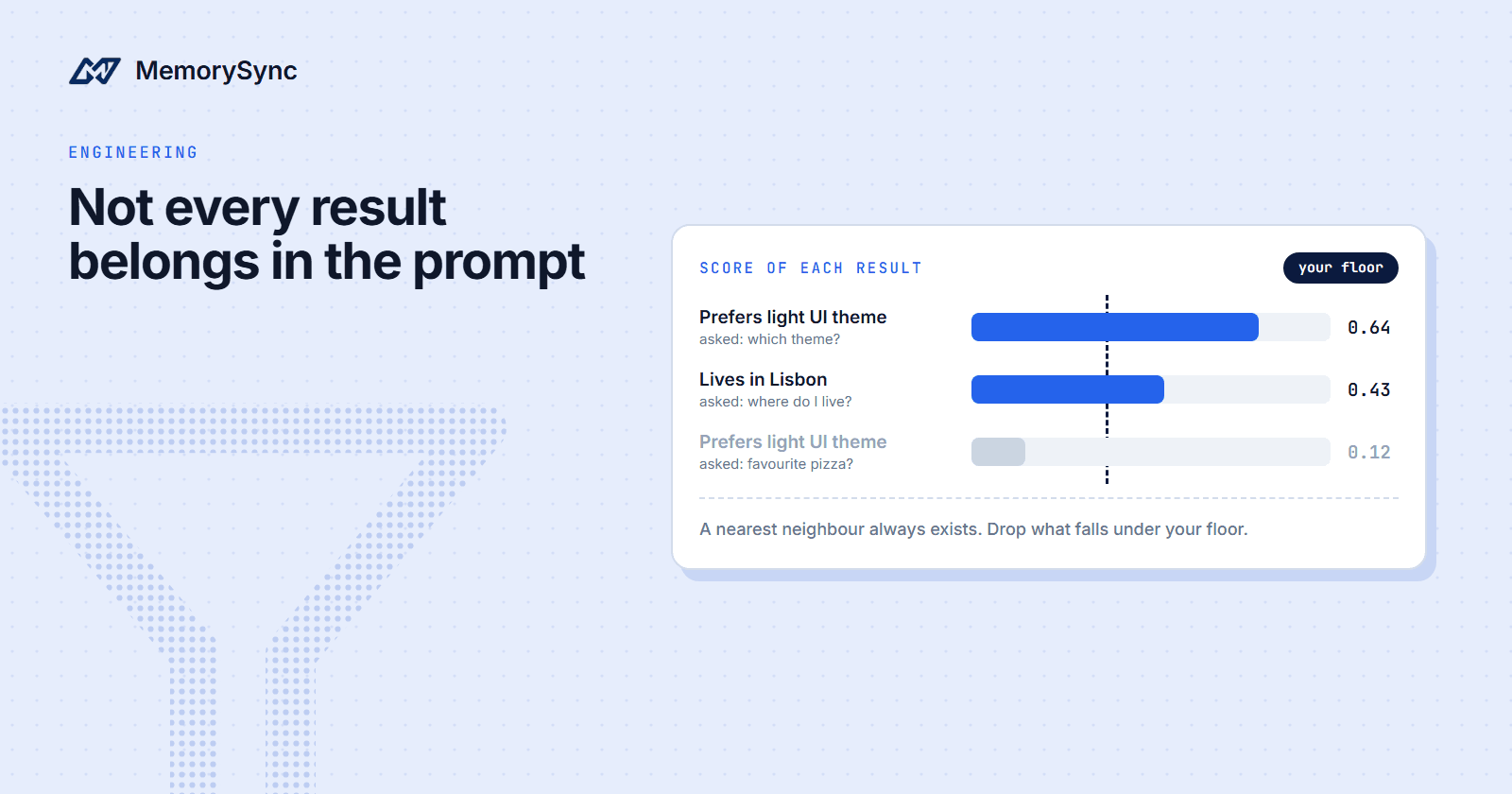
Ask a memory store a question it cannot answer and it still returns something. We asked for a user's favourite pizza topping, with nothing about food stored, and got back "Prefers light UI theme".
If that result reaches the prompt, the model has to decide what a UI theme says about pizza, and some models will try. This post explains why search behaves this way and how to keep weak results out of the prompt.
A question with no answer
We ran this against production with an evaluation key and an end user named sam, who held about twenty memories at the time: where he lives, his UI theme, his job, a half-marathon plan, a database migration at work. None of them mentioned food.
result = ms.query("What is the user’s favourite pizza topping?", k=5)for m in result.memories:print(m.id, round(m.score, 3), m.text)# 66430 0.119 Prefers light UI themeprint(result.context)# User Preferences:# - ui_theme: light
Asking for five returned one memory, with a score of 0.119. Across the query calls in the same run, relevant hits scored between 0.43 and 0.64: "Lives in Lisbon" scored 0.43 for "Where does the user live?", and "Prefers light UI theme" scored 0.64 for "Which UI theme does the user prefer?"
Another unanswerable question behaved the same way. Before Sam had any memory about programming languages, a search for "favourite programming language" as Sam returned "Orders service runs on MySQL" at 0.136 and "Prefers light UI theme" at 0.126.
The context block that came back with the pizza query, the prompt-ready text every query returns, held the theme preference as well. Inject context without checking scores and the off-topic memory goes into the prompt with everything else.
Why search always returns something
Semantic search ranks stored memories by how close their meaning is to the question. When nothing relevant is stored, some memory is still the closest, and a nearest-neighbour search returns it.
A smaller k does not fix this on its own. The pizza query asked for five results and got one, and that one was still off-topic.
The score does not say whether a memory answers the question. MemorySync ranks by semantic similarity combined with recency, importance and how often a memory is used, so a score places one memory against the other candidates for one question. The scoring_breakdown in the response shows the semantic part on its own: the theme memory's vector value was 0.799 for the theme question and 0.199 for the pizza question.
No single cut-off works everywhere, either. A correct answer scored 0.43 in our run, and the docs advise against depending on the ranking formula, so take the floor from scores you observe and check it again when your memories or questions change.
Filter before you build the prompt
query() takes no score threshold, so the floor lives in your code. Filter result.memories by score before anything reaches the prompt, and build the memory block from what passes:
import osfrom memorysync import MemorySyncClientSCORE_FLOOR = float(os.environ["MEMORY_SCORE_FLOOR"]) # chosen from your own logsdef memory_for_prompt(ms: MemorySyncClient, message: str):"""The memory block for this turn, plus what was kept and dropped."""result = ms.query(message, k=5)kept, dropped = [], []for m in result.memories:if m.score is not None and m.score >= SCORE_FLOOR:kept.append(m)else:dropped.append(m)if not kept:block = "No stored memory is relevant to this message."elif not dropped and result.context:block = result.contextelse:block = "\n".join(f"- {m.text}" for m in kept)return block, kept, dropped
Use result.context only when nothing was dropped. In every response we recorded, context listed every returned memory, so after filtering it can still contain the ones you removed.
Two habits keep the tail of weak results short:
- Ask for few results. The default
kis 5. A largerkmostly adds weaker matches, and every extra memory is one more thing the model may use. - Query with the current message. The user's latest message is usually the best query. A fixed query such as "everything about this user" matches every memory a little and none of them well.
Give the model a no-memory path
When nothing passes the floor, say so in the prompt. A model shown no memory block cannot tell whether memory was checked. A model shown an empty block and an instruction knows what to do:
<user_memory>No stored memory is relevant to this message.</user_memory>Use the memory above only where it applies. If it does not answer the question,say you do not know or ask the user. Do not guess from unrelated facts.
The MCP recall prompt in MemorySync follows the same pattern. When nothing matches, it writes "No stored memory matched this question." and tells the model to say so when memory is silent rather than invent an answer.
Tell ranking what you dropped
feedback() moves a memory's importance, one of the ranking factors. The feedback reference defines ignored as shown but not used, a weak negative, and negative as wrong or unhelpful. Send ignored for results your floor dropped, negative when a user rejects a remembered fact, and retrieved for the memories you did inject:
# After the reply has gone out, for example from a background task.for m in kept:ms.feedback(m.id, "retrieved")for m in dropped:ms.feedback(m.id, "ignored")# When the user says a remembered fact is wrong:ms.feedback(memory_id, "negative", comment="user says this is out of date")
Importance is a property of the memory and applies to every question, so an ignored signal for an off-topic hit also nudges that memory down for the questions it does answer. Pairing it with retrieved gives a memory that helps with some questions and is off-topic for others mixed signals, and mixed signals move importance less than consistent ones. Importance is clamped between 0.05 and 1.0, so no run of negative feedback makes a memory unreachable. Feedback is not billed; send it after the reply, from a background task.
Pick the floor from your logs
A floor copied from someone else's data, ours included, is a guess. Pick yours from labelled scores:
- For a week, log one row per returned memory: message id, memory id, rank and score. Log ids only, so the rows carry no user content.
- Label a sample as relevant or not relevant, in an access-controlled tool that looks up the text by id.
- For each candidate floor, count the irrelevant memories it would keep and the relevant ones it would drop.
- Ship the floor whose trade-off you accept, and alert if the share of turns with no memory jumps afterwards.
import jsonwith open("labelled_sample.jsonl") as f:rows = [json.loads(line) for line in f]for floor in (0.15, 0.2, 0.25, 0.3, 0.35, 0.4):kept_irrelevant = sum(1 for r in rows if r["score"] >= floor and r["label"] == "not_relevant")dropped_relevant = sum(1 for r in rows if r["score"] < floor and r["label"] == "relevant")print(f"floor {floor:.2f}: keeps {kept_irrelevant} irrelevant, drops {dropped_relevant} relevant")
In our run, any floor from 0.14 to 0.42 would have kept every relevant hit and dropped every off-topic one. That was one user with about twenty memories, so treat it as an illustration. Your floor depends on your memories, your questions and what a wrong memory costs: a stray preference in a coaching reply is an annoyance, while a wrong allergy in a meal plan is a safety problem.
Next step
Wrong results in the docs walks through diagnosing a bad retrieval one variable at a time, which is the next stop once your floor is in place.