Write Dates, Not "Last Weekend": Time in Agent Memory
A memory has two clocks: when something happened and when it was written. Why relative dates go stale, what we saw in production, and a helper that resolves them.
Published on 6 min read
On this page
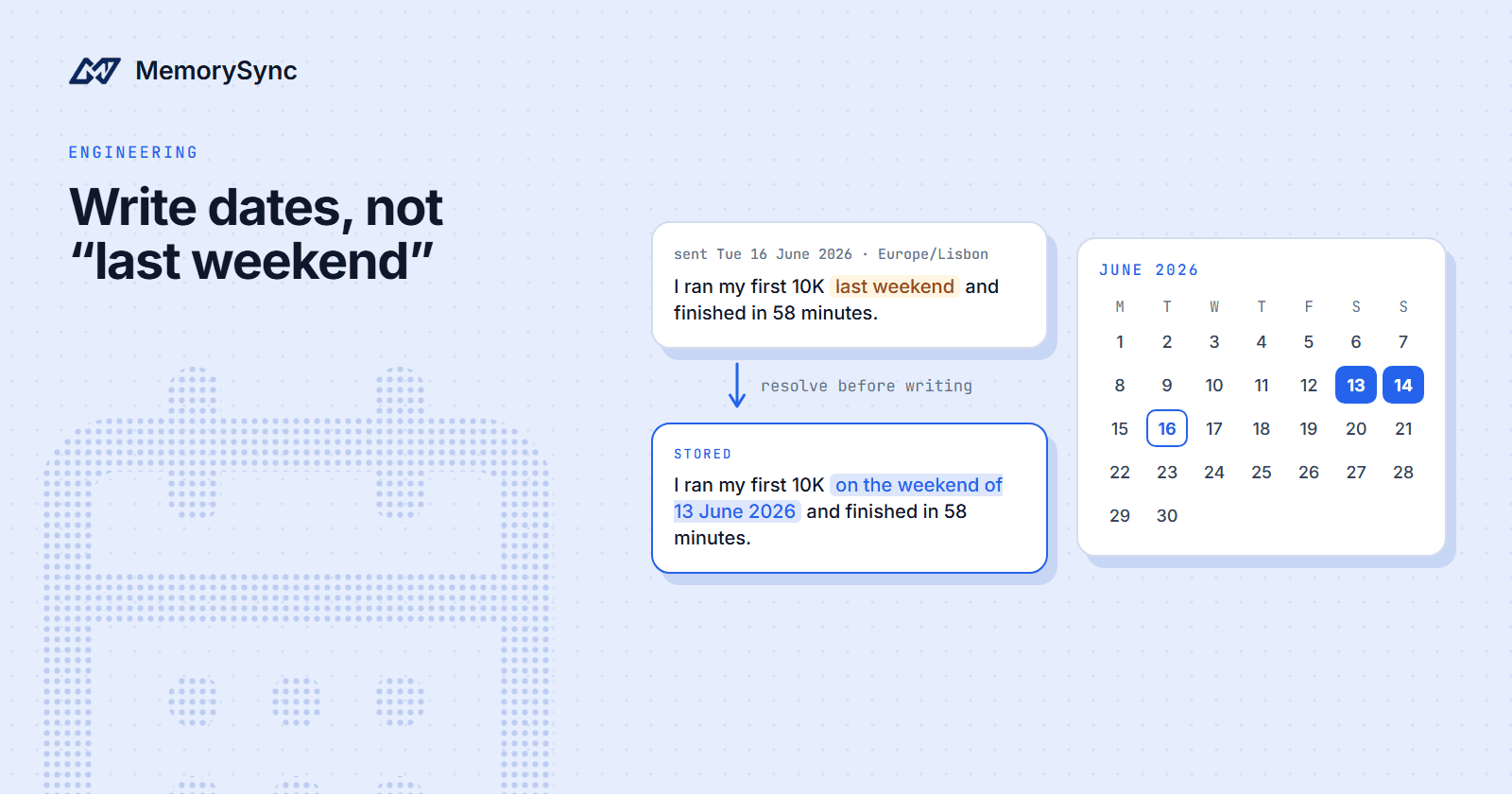
A user tells your fitness coach "I ran my first 10K last weekend." The sentence is true on the day it is said and misleading a week later, because "last weekend" moves with the calendar while the memory stays put.
This post covers how MemorySync stores time, what we saw when we ran the example against production, and the rules we recommend for writing dates into memory. The running example is Sam, who lives in Lisbon and uses a fitness coaching app.
Two clocks
Every memory involves two times. The event time is when the thing happened in the user's life: the race, the move, the injury. The write time is when your application stored the memory. They match only when someone reports an event the moment it happens, which is rare.
MemorySync records the write time as created_at, and recency ranking uses it. In the flow below, the event time exists only if you put it in the text. A memory that says "last weekend" has a write time and a phrase, and the phrase means something different each time it is read.
The gap between the two widens when users talk about the past or the future, when messages wait in queues, and when an import loads years of history in one run.
What we saw in production
We sent Sam's message as a user turn with add_turn, including the time it was sent:
ms.add_turn(tenant_id="default",user_id="sam",text="I ran my first 10K last weekend and finished in 58 minutes.",role="user",speaker="sam",occurred_at="2026-06-16T09:30:00Z",)
The fact stored from it was "10K run on last weekend to finish in 58 minutes". The relative phrase stayed as written. Sending occurred_at did not resolve it: on add_turn, occurred_at is part of the key that recognises a replayed turn. The memory's created_at is the time of the write, not 16 June, so recency ranking sees a fresh memory.
It was not the only case. "I moved to Lisbon last month." produced, among other facts, "Moved to Lisbon (last month)". The four-fact sentence in Inside the Write Path produced "Training for half marathon in March", which carries no year. By April, nothing in that memory says the race is over.
MemorySync does not resolve relative dates for you in this flow. Your application has to, before it writes.
Rules for writing dates
- Resolve relative dates before writing, or write the absolute date into the text. "On the weekend of 13 June 2026" stays true. "Last weekend" does not.
- Keep precision honest. A month is a month: "last month" becomes "in May 2026", not "on 16 May 2026". A weekend stays a weekend. A month without a year, like "March", needs the year the user meant.
- Use the user's time zone, not the server's. A message sent at 02:30 UTC on 16 June by someone in Los Angeles was sent at 19:30 on 15 June their time. "Yesterday" means 14 June to them, while a server working in UTC would write 15 June.
Resolve against the message timestamp, too, not the clock of the worker that processes it. A turn that waits an hour in a queue, or is replayed the next day, still happened when it was said.
A helper that resolves dates
The helper below rewrites four phrases using the message timestamp in the user's time zone. The result goes to add(), with the local date stored in metadata. It is deliberately small: it knows "today", "yesterday", "last weekend" and "last month", and leaves everything else as written.
import osimport refrom datetime import date, datetime, timedelta, timezonefrom zoneinfo import ZoneInfo # on Windows, install the tzdata packagefrom memorysync import MemorySyncClientdef _day(d: date) -> str:return f"{d.day} {d:%B %Y}" # 13 June 2026def resolve_relative_dates(text: str, sent_at: datetime, tz: str) -> tuple[str, date]:"""Rewrite a few relative date phrases as absolute dates.sent_at is when the user sent the message (timezone-aware), not whenyour worker picked it up. tz is the user's IANA time zone."""today = sent_at.astimezone(ZoneInfo(tz)).date()monday = today - timedelta(days=today.weekday())last_month = today.replace(day=1) - timedelta(days=1)phrases = {"today": f"on {_day(today)}","yesterday": f"on {_day(today - timedelta(days=1))}","last weekend": f"on the weekend of {_day(monday - timedelta(days=2))}","last month": f"in {last_month:%B %Y}",}pattern = re.compile(r"\b(" + "|".join(phrases) + r")\b", re.IGNORECASE)def replace(match: re.Match) -> str:found = match.group(0)new = phrases[found.lower()]return new[0].upper() + new[1:] if found[0].isupper() else newreturn pattern.sub(replace, text), todayms = MemorySyncClient(api_key=os.environ["MEMORYSYNC_API_KEY"],base_url="https://api.memorysync.io",end_user_id="usr_7f3a9c2e", # Sam)sent_at = datetime(2026, 6, 16, 9, 30, tzinfo=timezone.utc)text, said_on = resolve_relative_dates("I ran my first 10K last weekend and finished in 58 minutes.",sent_at,"Europe/Lisbon",)ms.add(text, metadata={"said_on": said_on.isoformat(), "time_zone": "Europe/Lisbon"})
For the 10K message this produces "I ran my first 10K on the weekend of 13 June 2026 and finished in 58 minutes." The text now carries the event time, and said_on keeps the day of the message in Sam's calendar for your own jobs and audits. Retrieval does not filter on metadata, so the date that matters for answers has to be in the text.
The replacements are written as time phrases ("on 13 June 2026"), which suits the common shape "I did X yesterday". A sentence that uses the phrase as its subject, such as "Yesterday was hard", comes out clumsy but still carries the right date.
Phrases the helper does not know, such as "a few weeks ago" or "in March", pass through unchanged. Extend the table with the phrases your users write, and when a phrase cannot be resolved, leave it vague rather than guess a precise date.
Imports and backfills
Imports have the widest gap between the clocks. Imported records are written on the day of the import, and recency ranking uses write time, so years of history look as if they had all just happened.
- Put the original date into the text of each imported record. Run the same helper with each message's own timestamp, not the time of the import.
- Do not rely on recency ranking for imported history. Every imported memory looks equally new, so recency cannot tell old from recent among them.
- Send a
client_reffor each record, so a resumed import skips what already landed.
Facts that expire
Some facts carry an end date: a paused membership, a trip, a recovery period. MemorySync does not expire memories for you in this flow, so "My gym membership is paused until 30 June 2026." stays retrievable on 1 July unless something deletes it.
Write each expiring fact in its own add() call, keep the id that comes back, and delete the memory on a schedule:
import osfrom datetime import datefrom memorysync import AddSkippedResponse, MemorySyncClient# ms is the client from the previous exampleresult = ms.add("My gym membership is paused until 30 June 2026.")if not isinstance(result, AddSkippedResponse):# expiring is a table in your own databaseexpiring.save(end_user_id="usr_7f3a9c2e", memory_id=result.id, ends_on=date(2026, 6, 30))def forget_expired(today: date) -> None:"""Run once a day."""for row in expiring.due(today): # rows whose ends_on is before todaywith MemorySyncClient(api_key=os.environ["MEMORYSYNC_API_KEY"],base_url="https://api.memorysync.io",end_user_id=row.end_user_id,) as client:client.forget([row.memory_id], reason="expired")expiring.remove(row)
One fact per call matters because add() returns one memory even when a sentence yields several. A sentence that mixed an expiring fact with a lasting one would leave you holding only one of the two ids. forget() is scoped to the end user the client names, which is why the job builds a client for each row.
Next step
Run a week of your users' messages through the helper and read what changes. Then read Memory Lifecycle in the docs.