Deleting a User's Memory Properly
How to delete an end user's memory in MemorySync: forget by id, filters with a dry run, transcripts and MCP deletes, the purge route to avoid, and a checklist.
Published on 6 min read
On this page
A user tells your assistant, "Forget that I'm allergic to peanuts." Another closes their account the same week, and your privacy policy says chat memories older than a year are deleted. Each request needs a different delete, and getting one wrong either leaves data behind or removes far more than you meant.
This post covers each case with MemorySync: what to call, what to check before and after, and the route you should never use. The examples follow an end user named Sam.
Where deletion requests come from
- "Forget that." One fact, named in the user's own words. Find the memory, confirm it is the one they mean, and delete it by id.
- An account closes. Everything for one end user goes: their memories in every project and environment that holds them, their transcripts, and the copies your own systems made.
- A retention rule fires. A scheduled job deletes the memories a policy covers, such as chat memories older than a year, for every end user.
A deletion we ran in production
We ran this against production with an evaluation key and the end user sam. Sam had sent "I am allergic to peanuts." twice, and both writes returned the same memory id, 66437, so there was one copy to delete.
import osfrom memorysync import MemorySyncClientms = MemorySyncClient(api_key=os.environ["MEMORYSYNC_API_KEY"],base_url="https://api.memorysync.io",end_user_id="sam",)before = ms.query("peanut allergy", k=3)print([(m.id, m.text) for m in before.memories])# [(66437, 'Is allergic to peanuts')]print(ms.forget([66437], reason="blog verification"))# [66437]after = ms.query("peanut allergy", k=3)print(after.memories, repr(after.context))# [] ''
The query found the memory before the delete. forget() returned its id, and the same query afterwards returned an empty memories list and an empty context string. The memory's vector is removed with it, so search has nothing left to match.
Forget by id or by filter
forget() (DELETE /memory/forget) deletes memories. It takes exactly one selector, a list of ids or a set of filters. Passing both is rejected rather than resolved by a precedence rule, because a wrong delete cannot be undone. Deletion is scoped to the calling end user in the key's project and environment, and a filter never reaches another end user's memories, including the organization's connector memories.
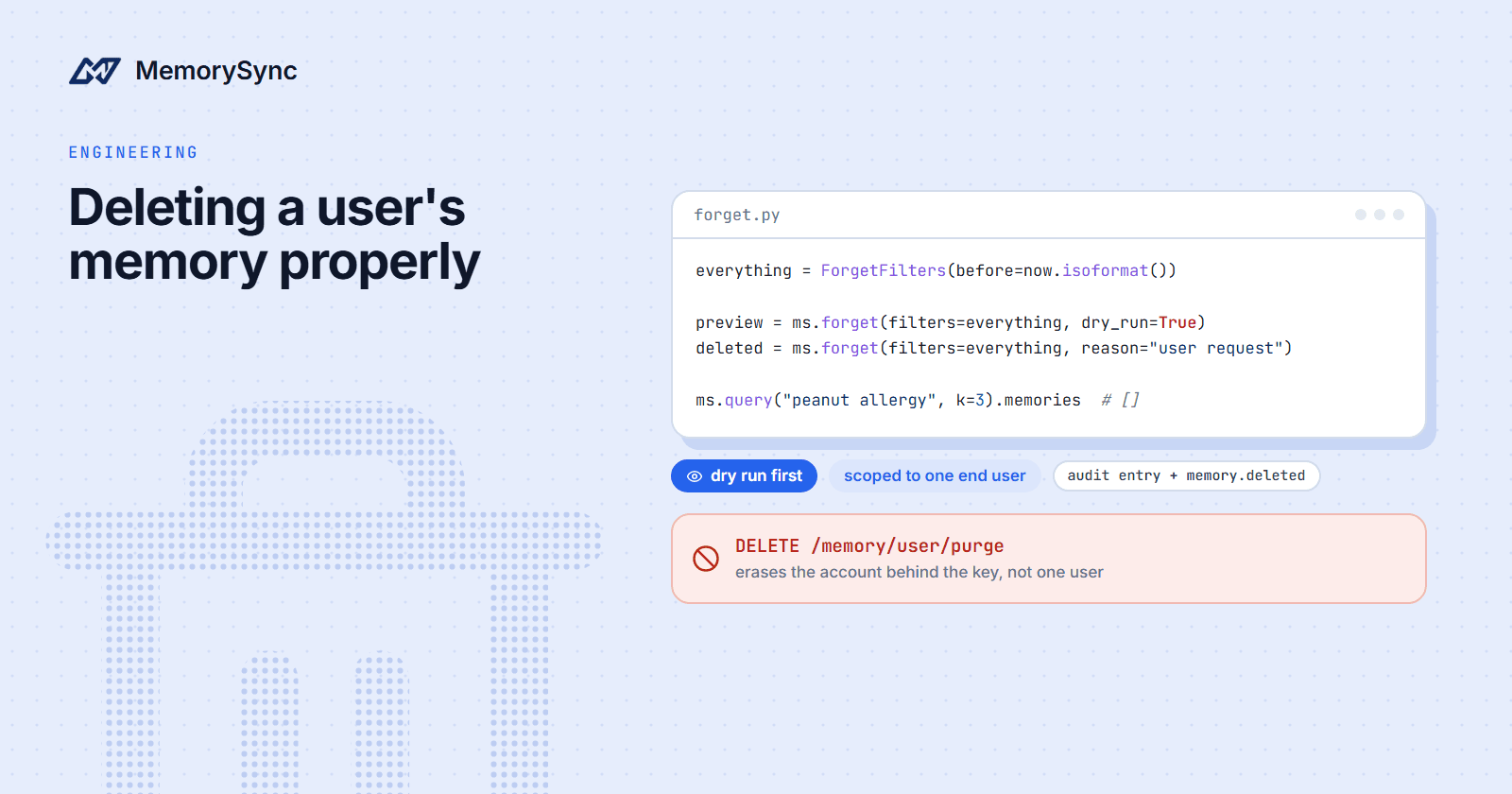
Filters select by source, event_type, tags (memories carrying all of them), tier, before and after. An empty filter is refused, so "delete everything" has to be an explicit criterion, such as before set to the current time. With dry_run=True the call returns the ids it would delete and removes nothing.
For "forget that", search with the user's words, show the user what you found, and delete by id. Do not rely only on ids saved at write time: one add() can store several facts and return just one of them. When we sent "I am a backend engineer at a logistics startup, I write mostly Go, and I am training for a half marathon in March.", four facts were stored and the response carried one.
Everything for one end user
For a closed account, delete with a wide filter, and check the result instead of assuming it:
import osfrom datetime import datetime, timezonefrom memorysync import ForgetFilters, MemorySyncClientdef erase_end_user(end_user_id: str) -> list[int]:"""Delete every memory one end user has in this key's project and environment."""# Stop new writes for this user first, so nothing lands after the cutoff.everything = ForgetFilters(before=datetime.now(timezone.utc).isoformat())with MemorySyncClient(api_key=os.environ["MEMORYSYNC_API_KEY"],base_url="https://api.memorysync.io",end_user_id=end_user_id,) as ms:preview = ms.forget(filters=everything, dry_run=True)deleted = ms.forget(filters=everything, reason="account closed")leftover = ms.forget(filters=everything, dry_run=True)if sorted(deleted) != sorted(preview) or leftover:raise RuntimeError(f"erasure for {end_user_id} needs review")return deleted
Run it once for each project and environment that holds the user's memories, with the matching key. Then delete at the source anything a connector indexed from them: Slack picks up deleted messages through its Events API, OneDrive and SharePoint purge the derived memories when a file is deleted, and Granola and S3 catch deletions on a scheduled reconciliation.
A retention rule
Deletion is per end user, so a retention job loops over the customers in your own database. It only works if writes were labelled with a consistent source when they were made:
from datetime import datetime, timedelta, timezonefrom memorysync import ForgetFilterscutoff = (datetime.now(timezone.utc) - timedelta(days=365)).isoformat()rule = ForgetFilters(source="support-chat", before=cutoff)# Inside your loop over end users, with a client for each one:preview = ms.forget(filters=rule, dry_run=True)if len(preview) <= expected_max:ms.forget(filters=rule, reason="retention: support-chat older than 365 days")else:alert_on_call(end_user_id, len(preview)) # an unusual count means look first
Keep the dry run in the scheduled job itself. A job that suddenly wants to delete ten times its usual number is more likely a bug than a policy.
From an MCP client
Over MCP, delete_memory removes memories by id, and its description tells the assistant to confirm with the user first. delete_entity removes every memory from one source, category or type, and delete_all_memories removes everything the connection can reach. Both default to dry_run=true and report a count. A real delete-all also needs dry_run=false and the exact confirmation string:
{"jsonrpc": "2.0","id": 7,"method": "tools/call","params": {"name": "delete_all_memories","arguments": { "dry_run": false, "confirm": "DELETE ALL MEMORIES" }}}
Without both arguments the call stays a preview and reports would_delete_count.
The purge route deletes the account
DELETE /memory/user/purge looks like the call that clears one user. It ignores X-End-User-ID and erases the account behind the credential instead, including its API keys and sign-in, and the credentials that could repair it are among the things it destroys.
The server refuses the route for API-key callers, and the Python SDK's purge_user() raises before any request leaves your process. Those guards came after callers who trusted an earlier description of the method lost their accounts.
Never call DELETE /memory/user/purge to clear an end user. To delete everything one end user has, use forget() with a before filter set to the current time.
Transcripts and framework state
Conversation history (/v1/history/*) is a separate store from memory. Turns are kept as given and never appear in memory search, lists or recall, so delete them separately. delete_history takes exactly one of session_id or ids, and delete_derived_facts=True also deletes the facts extracted from those turns:
result = ms.delete_history(tenant_id="acme",user_id="sam",session_id="support-thread-42",delete_derived_facts=True,)print(result["deleted_ids"], result["deleted_fact_ids"])
Framework state (/v1/state/*) is a third store, holding values a framework keeps between runs. delete_state without keys deletes a whole namespace. History and state deletes are free. Conversation history and framework state explains why the three are kept apart.
Retention and proof
An account closure or a retention job usually needs evidence as well as effect.
- Audited deletes.
POST /v1/memory/forgettakestenant_id,user_idandmemory_idsin the body, writes an audit entry and emits amemory.deletedwebhook. The Python SDK has no method for it, so call it over HTTPS from your backend. - Downstream copies. Subscribe any system that copies memory, such as a search index or CRM notes, to
memory.deleted, so the delete reaches the copy too. - The event log. Forgets appear in the user's memory event log, and the MCP tool
list_memory_eventswithevent_typeset toforgetlists them, newest first. - Audit retention. Audit retention is set in Settings → Audit, and entries past the window are removed in the background. Export entries before you shorten the window, or forward them to Splunk, Datadog or your own HTTPS endpoint if you must keep them longer.
- Dashboard trash. Memories moved to trash from the dashboard (Settings → Organization) stay recoverable for a limited window, and emptying the trash removes them for good.
Audit logs are included on every plan. Retention & Export documents the dashboard controls.
A checklist for each request
- Resolve the end-user id from your own records, never from the text of the request.
- For a closure, stop new writes for that user and let queued writes finish.
- In each project and environment that holds their memories, dry run, delete, then dry run again and expect an empty list.
- Delete their conversation history with
delete_derived_facts=True, and their framework state. - Delete at the source anything a connector indexed from them.
- Remove your own copies: prompt logs, traces, caches, exports and anything fed by webhooks.
- Run the queries that used to find their facts, and expect empty results.
- File the evidence with the ticket: counts, deleted ids, request ids and the audit entries.
Next step
The Forget reference has the full request and response contract, including filters and dry runs.