RAG vs Memory: Different Data, Different Jobs
RAG retrieves passages from a shared document corpus; memory holds small per-user facts that change. How each fails, when you need both, and where connectors fit in.
Published on 5 min read
On this page
A support agent for an invoicing app gets the message "my CSV export failed again". A good answer needs two things: the help-center article on export limits, and the fact that this customer, Sam, is on the Business plan and hit the same error last month.
The first is a retrieval-augmented generation (RAG) problem. The second is a memory problem. Both retrieve text for a prompt, which is why they often get built as one system, but the data and the ways they fail are different.
Two kinds of data
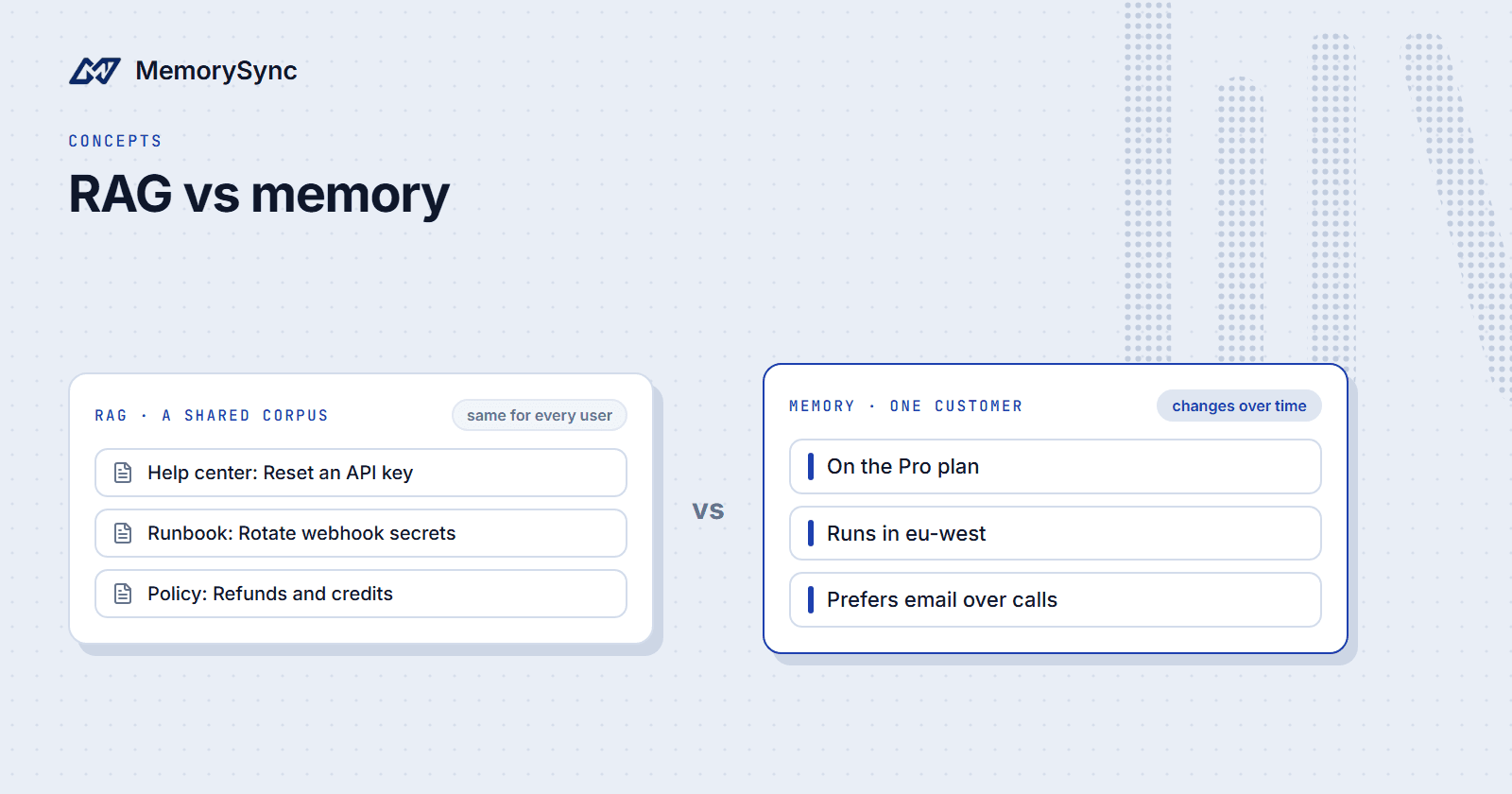
RAG retrieves passages from a document corpus: help-center articles, product docs, policies. Every user shares the corpus, it changes when someone edits a document, and it is split into chunks small enough to fit in a prompt. Answers often cite the passage they came from.
Memory holds small facts about one user: the plan Sam is on, the issues Sam reported, how Sam prefers to be contacted. The facts come from interactions, change over time, and have to be current and scoped to the person they describe. A fact about Sam is never a valid answer for anyone else.
The shape of the data differs as well. A help center is one corpus that everyone reads. Memory is many small sets, one per customer, and each set may only ever be read on behalf of that customer.
How each one fails
- Stale chunks. The export limit changed from 5,000 rows to 20,000, but the index still holds the old chunk. The agent quotes the old limit with a citation, which makes a wrong answer look authoritative.
- Superseded facts returned. Sam moved from the Team plan to the Business plan. If memory returns both plan facts, the agent may apply Team limits to a Business customer.
- Cross-tenant leaks. Memory search has to be filtered to one user on every call. One query path without the filter returns another customer's details, and nothing in the answer shows that it happened.
All three failures are quiet. The answer reads well, and only a check against the source document or the customer record shows that it is wrong.
The fixes differ. RAG needs re-indexing when documents change and removal of chunks whose source was deleted. Memory needs change handling when facts are written, and a user scope enforced on every read.
When you need both
Most support agents need both in one prompt:
- Search the help center with the customer's message and take the top few passages.
- Query memory with the same message, scoped to Sam, and take about five memories.
- Put each result set in its own labeled block: documentation as a citable source, memories as context about the customer.
- After the reply, write back anything new the conversation established, such as the export failing again after the upgrade.
HELP CENTER (cite by id)[doc-112] CSV exports are limited to 20,000 rows per file. Largerexports are split into several files.ABOUT THIS CUSTOMER (from memory: context, not a source to cite)- On the Business plan- CSV export failed on 16 June 2026 with a 30,000-row invoice list- Prefers email over phoneCUSTOMERMy CSV export failed again.
Keep the labels honest. A remembered detail is context about the customer, and the model should not cite it as if it were documentation.
With both blocks in place, the agent can explain the 20,000-row limit from the help center and point out that Sam's list was larger, without asking Sam to repeat what happened last month.
Connectors blur the line
Some knowledge sits between the two. A team's GitHub issues, Google Drive documents, Notion pages and OneDrive files are not one customer's memories, and they are not a public help center either.
MemorySync's connectors sync that content as organization knowledge. GitHub brings in repositories, issues and pull-request comments. Google Drive reads only the files a user picks in the Drive Picker and is polled on a schedule. Notion reads the pages and databases shared with the integration, and OneDrive reads DOCX, PPTX and XLSX text from the connected drive.
Connector memories are readable across the organization. Inside a project, a search returns the project's memories plus the organization-wide connector memories, so the support agent's query for Sam can also surface the GitHub issue where engineering tracked the export bug. For each connector, see Connect GitHub, Google Drive, Notion and OneDrive.
The docs recommend a clear split for answers that must cite sources: your own retrieval system finds the passages, and MemorySync supplies the user's context. For a large public corpus quoted passage by passage, keep a dedicated RAG index next to memory.
Side by side
| Property | RAG | Memory |
|---|---|---|
| Data | Shared documents | Small facts about one user |
| Where it comes from | Authored content | Interactions with the user |
| How often it changes | When a document is edited | Whenever the user's situation changes |
| Unit of retrieval | A chunk of a document | One fact or preference |
| Who may read it | Everyone allowed to see the corpus | One end user |
| Typical failure | Stale chunk | Superseded fact, or a missing user filter |
| Role in the prompt | Citable source | Context about the user |
One test sorts most content. If it would read the same for every customer, it belongs in the document index. If it is about one customer, it belongs in memory, scoped to that customer.
What MemorySync handles
MemorySync extracts durable facts from what you send, and when a new value arrives for a one-value fact such as a city, it replaces the old one. After "I live in Berlin." and later "I moved to Lisbon last month.", a query for where the user lives returns only "Lives in Lisbon".
Replacement covers one-value facts only. If "Our orders service runs on MySQL." is stored and "The orders service runs on Postgres." arrives later, both stay stored, and a question about the database can still return MySQL first. When your application knows a fact has changed, delete the old memory with forget(), then ask the question again and check that only the new fact comes back.
For values another system owns, such as the plan in your billing database, that system is the authority. Read the current value from it when the answer depends on it, and treat the remembered plan as context.
Every call is scoped to the end user named in X-End-User-ID, and a call without one is rejected with a 400, so a missing filter fails loudly instead of returning other customers' facts. Your application still has to send the right id for the signed-in customer.
Next step
The RAG and knowledge assistants guide lists the steps for building the combined prompt and the checks to run before release.