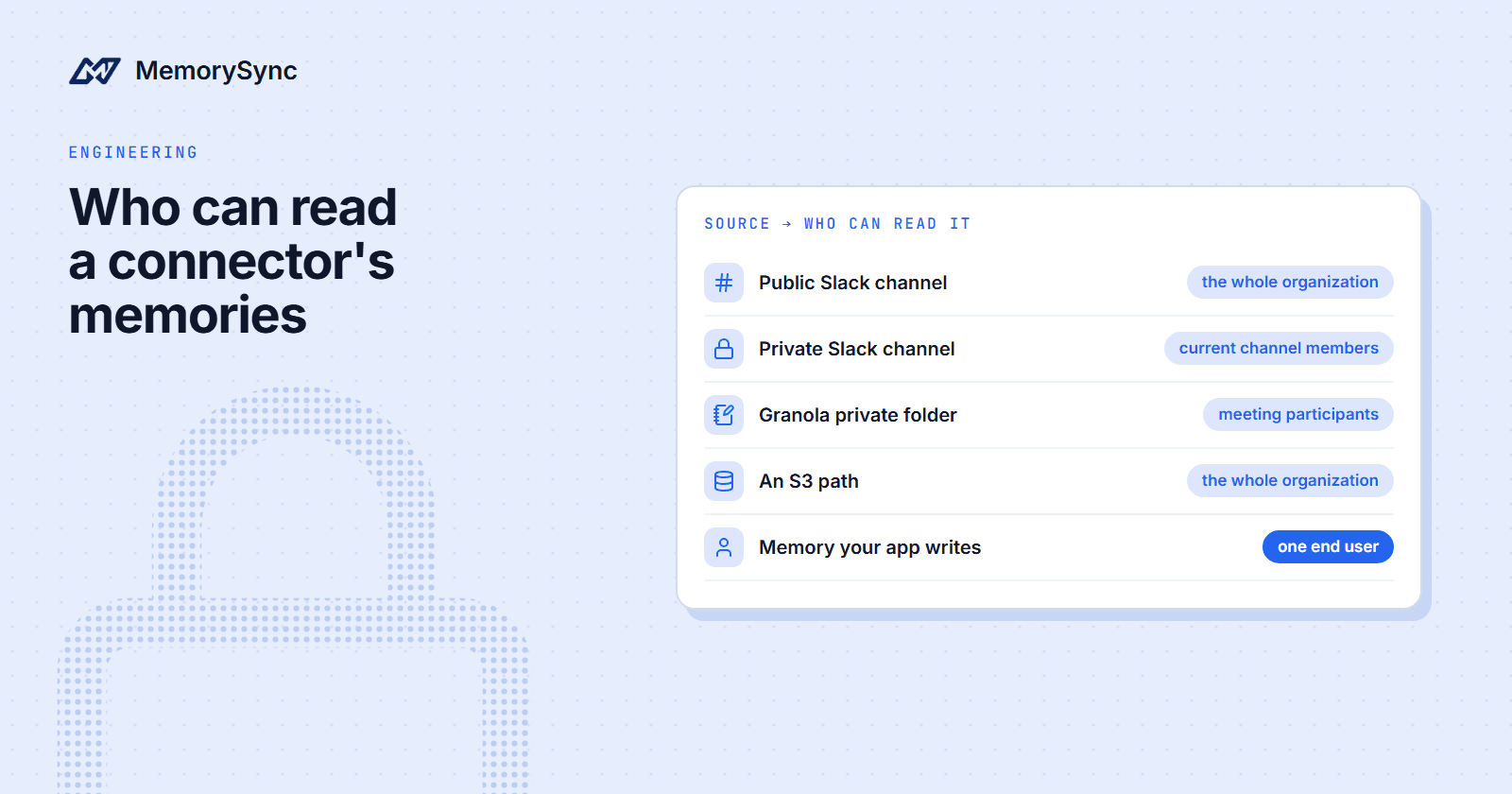
Who Can Read a Connector's Memories
API-written memories belong to one end user; connector memories are organization knowledge. Who can read each, how private sources are gated, and what to leave out.
Published on 5 min read
On this page
Connecting Slack, Granola or an S3 bucket to MemorySync creates memories that no single end user owns. Before an administrator approves a channel or a folder, someone should know who will be able to read what comes out of it.
We will follow one organization through the decisions. It runs an internal engineering assistant and wants to connect Slack, GitHub, Granola and an S3 bucket, using the connectors from New Connectors: Slack, Granola and Amazon S3.
Sam, an engineer, is a member of the private #incident-review Slack channel. Alex, another engineer, is not.
Two kinds of memory
| Kind | How it gets there | Who can read it |
|---|---|---|
| API-written | add(), add_turn or a framework package, naming an end user on every call | That end user, in that project and environment |
| Connector | A connected source syncing into the organization | The organization, unless the source has a narrower rule |
An API-written memory for Sam is invisible to Alex, because reads, searches and deletes are filtered to the end user, project and environment, as covered in Scoping Every Memory. A connector memory is organization knowledge. It belongs to the organization that connected the source, and by default it is readable across that organization.
Who can read connector memories
| Source | What MemorySync reads | Who can read the memories |
|---|---|---|
| GitHub | Selected repositories: code, issues, pull-request comments | The organization |
| Google Drive | Only files a user picks in the Drive Picker (drive.file scope) | The organization |
| Notion | Pages and databases shared with the integration | The organization |
| OneDrive and SharePoint | The connected user's drive, plus document libraries with Sites.Read.All | The organization |
| Slack public channels | Channels an administrator approves | The organization |
| Slack private channels | Approved private channels, off by default | Current channel members with linked MemorySync accounts |
| Granola workspace folders | Folders an administrator approves | The organization |
| Granola private folders | Approved private folders, off by default | The meeting's participants with linked MemorySync accounts |
| Amazon S3 | Paths (prefixes) an administrator approves | The organization |
Private Slack channels and Granola folders
These are the only sources with per-person access. A private-channel memory is readable only by the channel's current members, and membership is checked at query time. When Alex searches, nothing from #incident-review comes back. If Sam leaves the channel, Sam's next search stops returning it as well.
The check needs a link between the person in Slack and a MemorySync account, so a channel member who has not linked one gets nothing from the channel. Granola private folders work the same way, with the meeting's participants, taken from the note's attendees, in place of channel members.
OneDrive, SharePoint and S3
OneDrive and SharePoint records carry the visibility scope of the source file, which records who could see the file at the source. It does not filter queries per person and does not replace MemorySync roles, so treat these memories as organization-wide.
S3 memories are organization-wide without exception. Object storage has no per-user permission model to derive narrower access from.
Connector memories inside a project
Inside a project, a search includes that end user's memories in the project plus the organization-wide connector memories. That is what lets the engineering assistant answer a question about a past decision from a Slack thread and a pull request in one query.
It also makes the organization the boundary that matters for connectors. If the same organization runs a customer-facing support bot, a customer's search can include organization-wide connector memories too. Keep internal connectors in an organization that serves only your own team, or connect only content that every end user of every project in it may see.
Controls before anything is indexed
- Roles. Connecting, updating and disconnecting a source needs the admin or owner role.
- Approval. Slack reads only the channels an administrator approves, Granola only approved folders and S3 only approved paths. A Granola note that sits in no approved folder is never indexed.
- Slack limits. Direct messages and group DMs are not read. Channels shared with an external organization are blocked by default, private channels are off by default, and a channel exclusion policy covers channels that must never be indexed.
- Granola exclusions. A folder exclusion policy covers HR, legal and review folder names.
- S3 exclusions. Keys that look like credentials (
.envfiles, private keys, Terraform state,.sshcontents) are excluded for every organization and cannot be re-enabled. Exclusions are decided from the bucket listing before any download, Glacier and Deep Archive objects are skipped, and MemorySync never writes to the bucket. - Redaction. Slack, Granola and S3 redact credentials before indexing.
- Deletion follows the source. Slack edits and deletions arrive through the Events API. Granola and S3 run a scheduled reconciliation that purges the memories of deleted notes and objects. Deleting a OneDrive or SharePoint file purges the memories derived from it.
Choosing what to connect
One test works for every source: would you be comfortable seeing any sentence from it in an answer given to anyone in the organization? If yes, connect it. If not, leave it out, or keep it in a private channel or folder whose readers have linked accounts.
- Good candidates: decision and architecture channels, design docs, runbooks, specs, the repositories the team works in, and folders of project meeting notes.
- Leave out HR, legal, compensation and performance reviews, and anything that holds personal data about customers. Granola's exclusion policy catches common HR, legal and review folder names, but a folder name is not a guarantee. The safer control is never approving the folder.
- Approve the narrowest S3 prefix that holds what you need, such as
handbook/, rather than the bucket root. - Treat credential redaction as a safety net. It does not make a folder of secrets safe to connect.
- Approve a private Slack channel only after the people who need it have linked their accounts. Until they do, its memories are indexed and nobody can read them.
Checking what is connected
The hosted MCP server has a tool for this review. list_connected_sources reports each connected source with its provider, its status, whether sync is enabled and when it last synced. An assistant can call it to explain where an answer came from, and you can call it yourself:
{"jsonrpc": "2.0","id": 1,"method": "tools/call","params": {"name": "list_connected_sources","arguments": {}}}
The same list is available as the memorysync://sources resource. Run the check whenever someone approves a new channel, folder or path, and compare the result with what you meant to connect.
Next step
Before approving the next source, read its page in the docs, starting from the integrations overview, and decide which organization it belongs in.