Quickstart: Store a Fact, Then Ask for It Back
Create an API key, install the Python or TypeScript SDK, store one fact for an end user, query it back in other words, and handle skipped writes and errors.
Published on 6 min read
On this page
An assistant that forgets what a user said yesterday makes that user repeat themselves. This guide stores one fact for one user and then asks for it back in different words, first in Python and then in TypeScript.
MemorySync is a hosted memory API. Your application stores memories scoped to an end user, and MemorySync returns the relevant ones ranked by meaning. The example end user is Sam, who mentioned a peanut allergy in an earlier conversation. You need Python 3.9 or later, or Node.js 18 or later.
Create a key and install
- Sign in to the dashboard, select a project and create a key under Settings → API Keys. A key created while a project is selected is locked to that project.
- Install the SDK for your language.
- Put the key in the
MEMORYSYNC_API_KEYenvironment variable, so it never appears in your code.
pip install memorysync # Pythonnpm install memorysync-sdk # TypeScript or JavaScriptexport MEMORYSYNC_API_KEY="ms_..."# PowerShell: $env:MEMORYSYNC_API_KEY = "ms_..."
Keep the key on your server. Whoever holds it can name any end user in its project and read that user's memories, so it must never ship in a browser bundle or a mobile app.
If your key is organization-wide rather than locked to a project, also pass project_id (projectId in TypeScript) with the ID from the project menu in the dashboard header. The ID is proj_ followed by 16 hexadecimal characters.
Store a fact, then query it
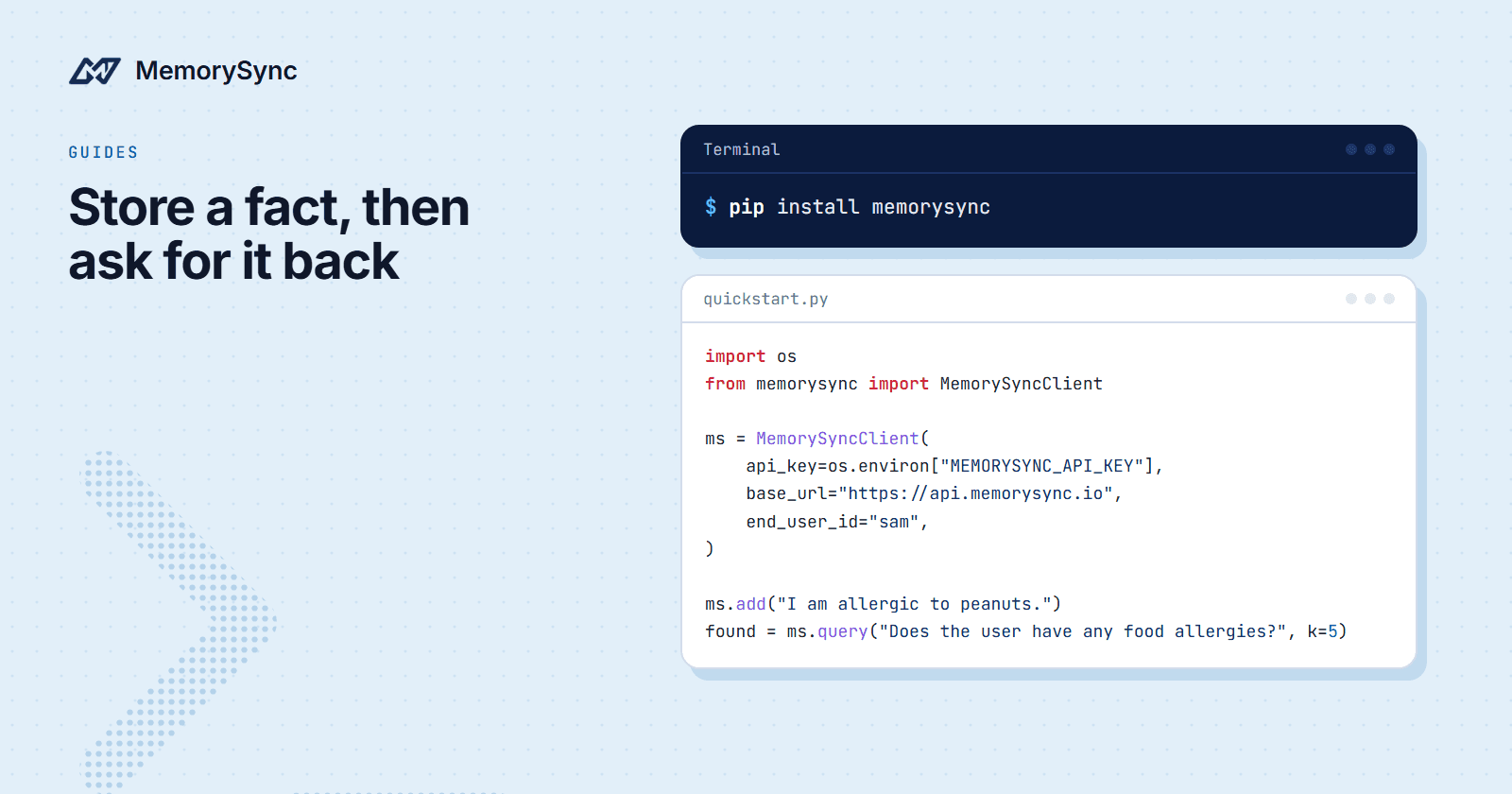
Save this as quickstart.py and run python quickstart.py:
import osfrom memorysync import AddSkippedResponse, MemorySyncClientwith MemorySyncClient(api_key=os.environ["MEMORYSYNC_API_KEY"],base_url="https://api.memorysync.io",end_user_id="sam",) as ms:result = ms.add("I am allergic to peanuts.")if isinstance(result, AddSkippedResponse):print("skipped:", result.reason)else:print("stored:", result.id, result.text)found = ms.query("Does the user have any food allergies?", k=5)for memory in found.memories:print(memory.id, memory.text, memory.score)
What each part does:
MemorySyncClienttakes your key, the API base URL and the end user. It sends the key as theX-API-Keyheader and the end user asX-End-User-IDon every request.api_keyandbase_urlare both required.add()sends the text to POST/memory/addand returns the outcome of the write.query()sends the question to POST/memory/query.k=5asks for at most five memories.- The
withblock closes the client's connections when it ends.
The question does not repeat the words of the fact. Results are ranked by meaning, so a question about food allergies can bring back a memory about peanuts.
What comes back
query() returns a QueryResponse. Its memories field is a list of Memory objects in ranked order, most relevant first. These are the fields you will use most:
| Field | What it holds |
|---|---|
id | The memory's integer id. Pass it to get(), or in a list to forget(). |
text | The memory as stored. Print it rather than assuming it matches your input word for word. |
score | How well the memory matched this query. Higher is a closer match. |
created_at | When the memory was written. |
add() returns one of two shapes. When MemorySync stores the input, you get a Memory with an id and text. When the input carries nothing worth keeping, MemorySync stores nothing and returns an AddSkippedResponse, and its reason field says why. A skip is a normal outcome, so it does not raise an exception.
Check the type before you read result.id. An AddSkippedResponse has no id field, which is why the example branches with isinstance first.
Both classes are importable from memorysync, next to the client. Branch on the result type for every write: a call that returned without an error has not necessarily stored anything.
In this example Sam has only the memory you just stored. Once an end user has more, the list can also include weaker matches ranked below the best one, up to k of them, so look at score before you pass a result on to a model.
The same steps in TypeScript
Save this as quickstart.mts and run it with npx tsx quickstart.mts. The .mts extension makes the file an ES module, which top-level await needs.
import { MemorySyncClient } from "memorysync-sdk";const ms = new MemorySyncClient({apiKey: process.env.MEMORYSYNC_API_KEY!,baseUrl: "https://api.memorysync.io",endUserId: "sam",});const result = await ms.add({ text: "I am allergic to peanuts." });if ("status" in result && result.status === "skipped") {console.log("skipped:", result.reason);} else {console.log("stored:", result.id, result.text);}const { memories } = await ms.query({ query: "Does the user have any food allergies?", k: 5 });for (const memory of memories) {console.log(memory.id, memory.text, memory.score);}
The TypeScript client takes one options object per call and uses camelCase names: apiKey, baseUrl, endUserId. A skipped write comes back as an object with status: "skipped" and a reason, so the branch checks status instead of a class. Memory records use camelCase fields as well, such as createdAt.
Why every call names an end user
One API key serves all of your users, so every API-key call has to say which user it is for. That person is the end user, Sam in this guide. The client sends the id you gave it as X-End-User-ID on every request.
Leave it out and the API answers 400 with the error code MISSING_END_USER_ID, which both SDKs raise as ValidationError. An end-user id longer than 128 characters gets a 400 with INVALID_END_USER_ID.
Reads, searches and deletes are filtered to that end user, the key's project and the key's environment. A memory stored for an end user named alex does not come back when sam searches for it, even with the same key.
The environment comes from the key, never from the request. A development key and a production key see different data, so a fact written with one does not show up in queries made with the other. If a query comes back empty right after a write, check that both calls used the same key and the same end-user id.
Use an id that stays the same for the life of the person's account, such as the primary key from your users table. Changing the id creates a different memory scope. Avoid email addresses: people change them, and the id travels in a header on every request.
When a call fails
Every non-2xx response raises a subclass of MemorySyncError. The TypeScript SDK throws the same classes.
| Exception | Raised on |
|---|---|
AuthError | 401 or 403: a bad key or a missing scope |
ValidationError | 400, 409 or 422, including a missing end user |
NotFoundError | 404: the record is not visible to this caller |
RateLimitError | 429: read retry_after_seconds before retrying |
ServerError | Any 5xx response |
MemorySyncError | Network errors, timeouts and anything else |
Each error carries status_code, response (the parsed body) and request_id. In TypeScript the names are statusCode, response and requestId, and the retry hint is retryAfterSeconds.
import timefrom memorysync import MemorySyncError, RateLimitErrordef lookup(ms, question):try:return ms.query(question, k=5).memoriesexcept RateLimitError as err:time.sleep(err.retry_after_seconds)return ms.query(question, k=5).memoriesexcept MemorySyncError as err:print("lookup failed:", type(err).__name__, err.status_code, err.request_id)return []
Catch the specific classes first. They are subclasses of MemorySyncError, so an except MemorySyncError placed above them would catch everything. When a 429 response carries no retry hint, retry_after_seconds is 0.0, so add your own backoff for that case.
Log request_id. It comes from the x-request-id header on the response, and it is how support finds the exact request you are asking about. Errors that never got a response, such as timeouts, have no request id.
Next steps
The docs quickstart covers the same two calls with cURL. Before you pick end-user ids for production, read Scopes & End Users, which explains how the API key, the project and the end-user id fit together and how to choose a safe id.